ChatGPT memory is a running summary ChatGPT builds about you across all of your chats: who you are, what you’re working on, how you like your answers. It is separate from your chat history, and deleting your chats does not delete it.
This guide shows you how to see what ChatGPT has saved about you, how to control or delete it, and where it fits in the bigger picture your AI is building: your history, files, instructions, and connected apps.
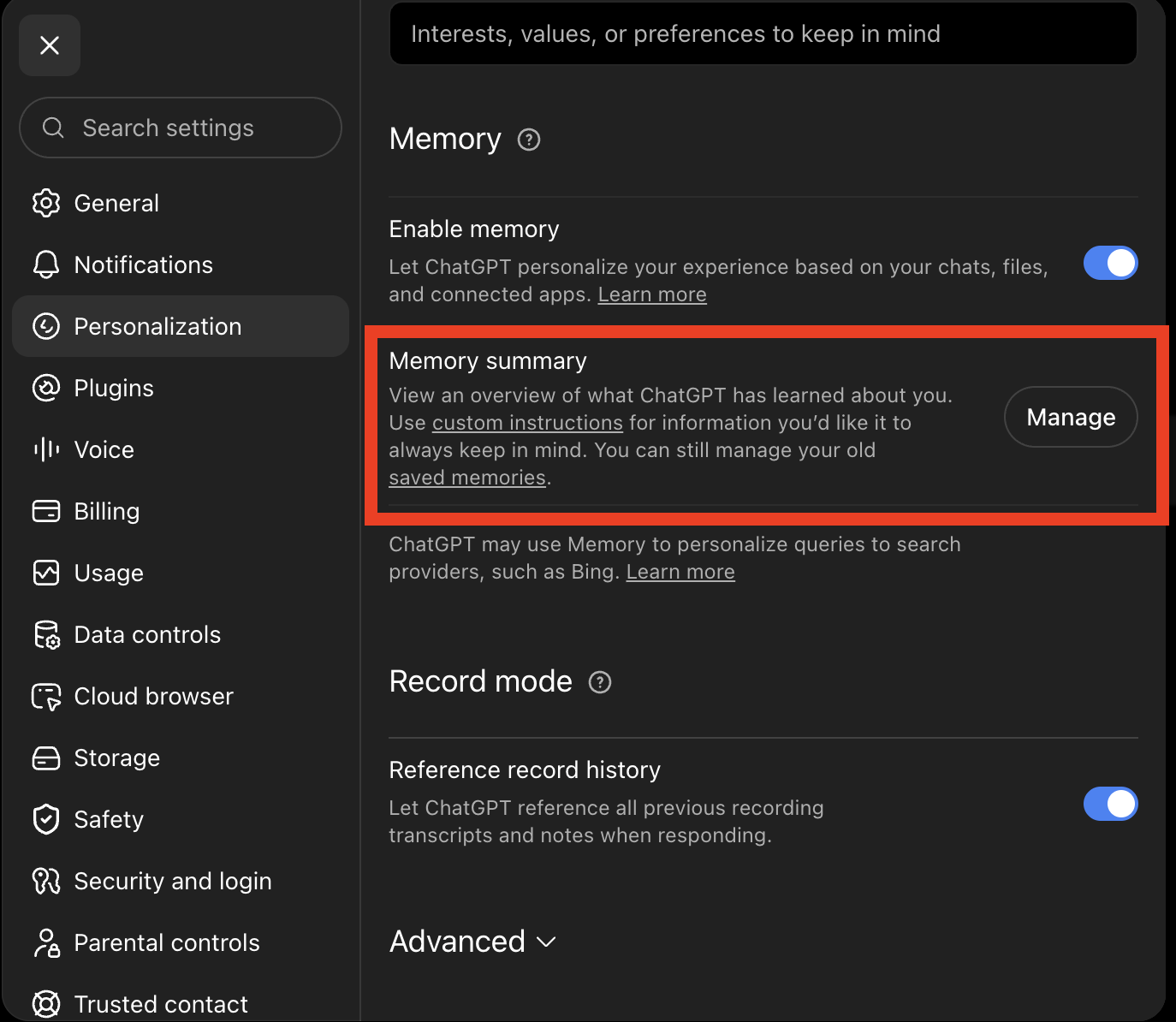
See it in the next 60 seconds. Open ChatGPT and ask it: “What do you know about me? Be specific.” Then open Settings → Personalization → Memory and read what’s saved there. Most people have never looked.
Prefer to watch? This guide has a companion video: ChatGPT Memory: What Does It Know About You? (under 4 minutes).
What ChatGPT Memory Is (and Isn’t)
ChatGPT memory is no longer a simple list of saved facts; it is a running synthesis of your chats. Think of an executive assistant: ask them what they know about the person they work for and they could hand you a long list of facts — but if they have worked together for a while, that list is a small sample of what they actually know. ChatGPT’s memory works the same way, which is why OpenAI’s own docs note that the summary you can see “will not include everything that ChatGPT remembers.”
That is also why memory is genuinely useful, not just a risk: an assistant who knows all about you can help you far better than one who knows nothing, and the same is true of your AI. Keeping it on is a reasonable choice. The point is that it should be your choice: the controls live at Settings → Personalization → Memory — the switch there is called Enable memory, and to wipe what’s stored and switch it off in one move, open the memory summary’s three-dot menu and choose Delete and turn off memory. For the click-by-click settings tour, including training and temporary chats, see Is ChatGPT Private? What Really Happens to Your Chats.
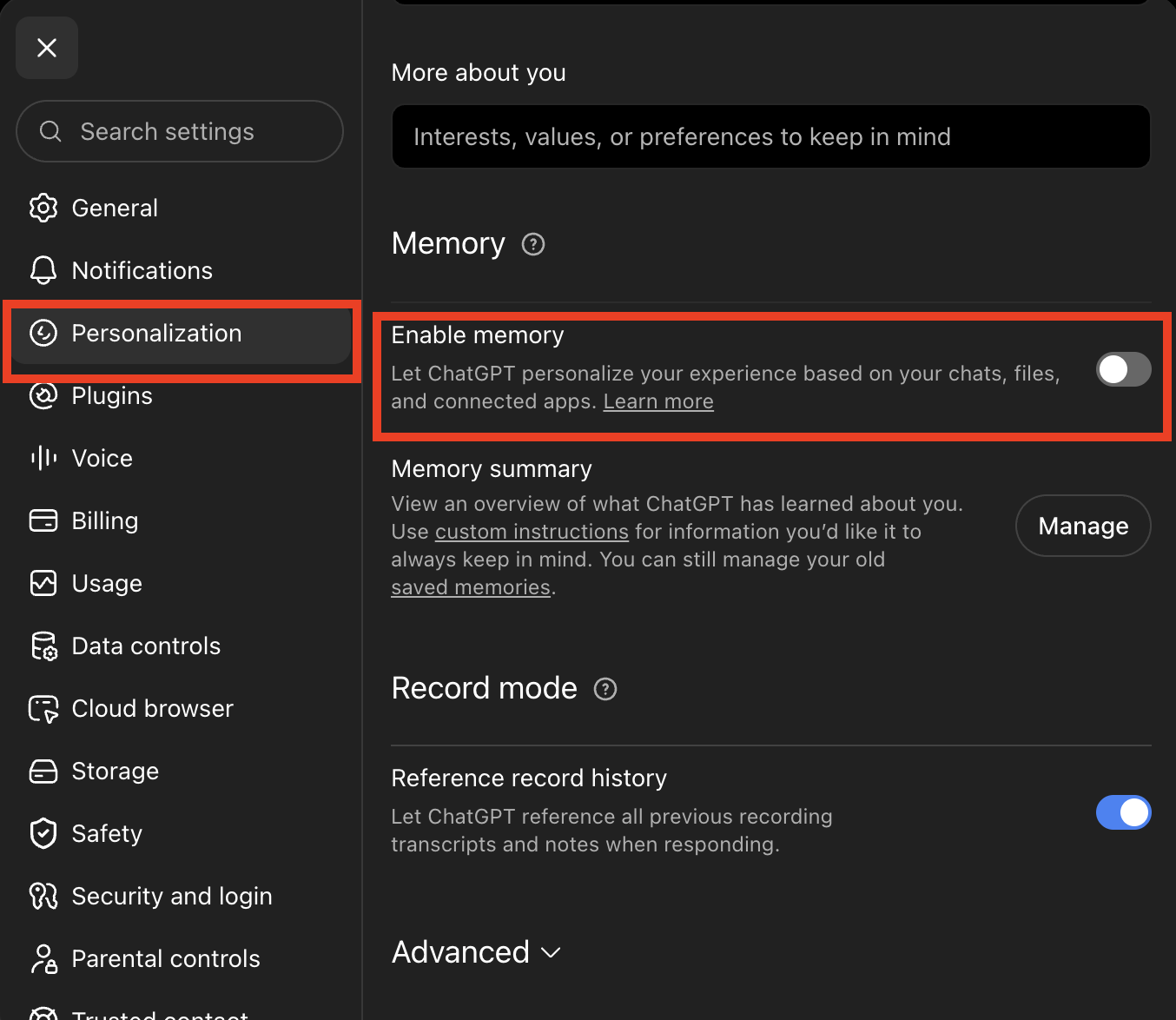
ChatGPT’s Personalization screen with the Enable memory toggle. Captured August 2026.
ChatGPT Memory, History, and Training Are Three Different Switches
The most common AI privacy mistake is treating these as one thing. They are three, and the off switches do not cascade:
- Turning training off does not turn memory off. Your provider can stop learning from your chats and still remember everything about you.
- Turning memory off does not delete your history. The chats that fed the memory are still there, and as of August 2026, re-enabling ChatGPT’s memory can rebuild it from any chats still in your history.
- Deleting your history does not remove what a model already learned. Data that went into training stays in the trained model. That switch only works forward, which is why it’s the one to set first.
Claude and Gemini keep their own versions of the accumulation, as of August 2026. AI memory features go by a different name on every product, but the principle is the same on all three: the memory switch, the history switch, and the training switch are separate, and you have to check each one.
- Claude: memory is controlled by a “Generate memory from chats” toggle at Settings → Memory, so check whether yours is on. It keeps a separate memory space per project, and you can view entries by category, edit them, pause new ones while keeping the old, or reset everything.
- Gemini: memory sits under Settings & help → Personal Intelligence and learns from your past chats. Your raw history is managed separately at Gemini Apps Activity.
See It, Move It, Delete It
Three things you can do this week, whatever AI you use. Paths are for the web app; in the ChatGPT mobile app, tap your profile icon and you’ll find Memory sitting directly on the settings screen, with the same Enable memory switch.
See it. Read what your assistant has saved about you. Most people have never looked. ChatGPT: Settings → Personalization → Memory. Claude: Settings → Memory. Gemini: Settings & help → Personal Intelligence for memory, plus Gemini Apps Activity for your raw history.
Move it. Every major assistant can hand you an archive, as of August 2026:
- ChatGPT: Settings → Data Controls → Export data, which OpenAI says includes your chat history and other account data.
- Claude: Settings → Privacy → Export data (conversation and account data; not available from the mobile apps).
- Gemini: Google Takeout covers your chats, generated media, and uploads.
Two caveats. Exports arrive as download links and zip files, so this one is easiest at a computer. And one line from Google’s docs applies everywhere: downloading your data does not delete it.
And here is where the ownership half of the argument lands. That picture is a compounding asset: the longer you use an AI, the better it knows you and the more useful it gets. When a provider holds that accumulation, every switch means starting over as a stranger. It is like spending years building a relationship with an executive assistant who works for another company, instead of your own: the better they know you, the harder it gets to leave. That is lock-in, and it is why where your AI’s memory of you lives is the real question, not just who can read it. (We make the full argument in The Part Worth Owning.)
The structural answer is an interface you own: apps like Jan, Open WebUI, and BrainDrive hold your history in the app itself, so your accumulation follows you when you change which model is behind it. (I’m building BrainDrive. The portability comes from the design, not from trusting me: the history lives in the app, and the model behind it is swappable. The guide states where it fits and where it doesn’t.)
Delete it. Deletion works, with exceptions worth knowing: as of August 2026, ChatGPT schedules deleted chats for permanent deletion within 30 days with security or legal exceptions, and Gemini chats that went to human reviewers can be kept up to 3 years even if you delete your activity. Deleting memory and deleting history are separate acts on every major assistant; do both if you mean both.
The Bigger Picture: Your Context
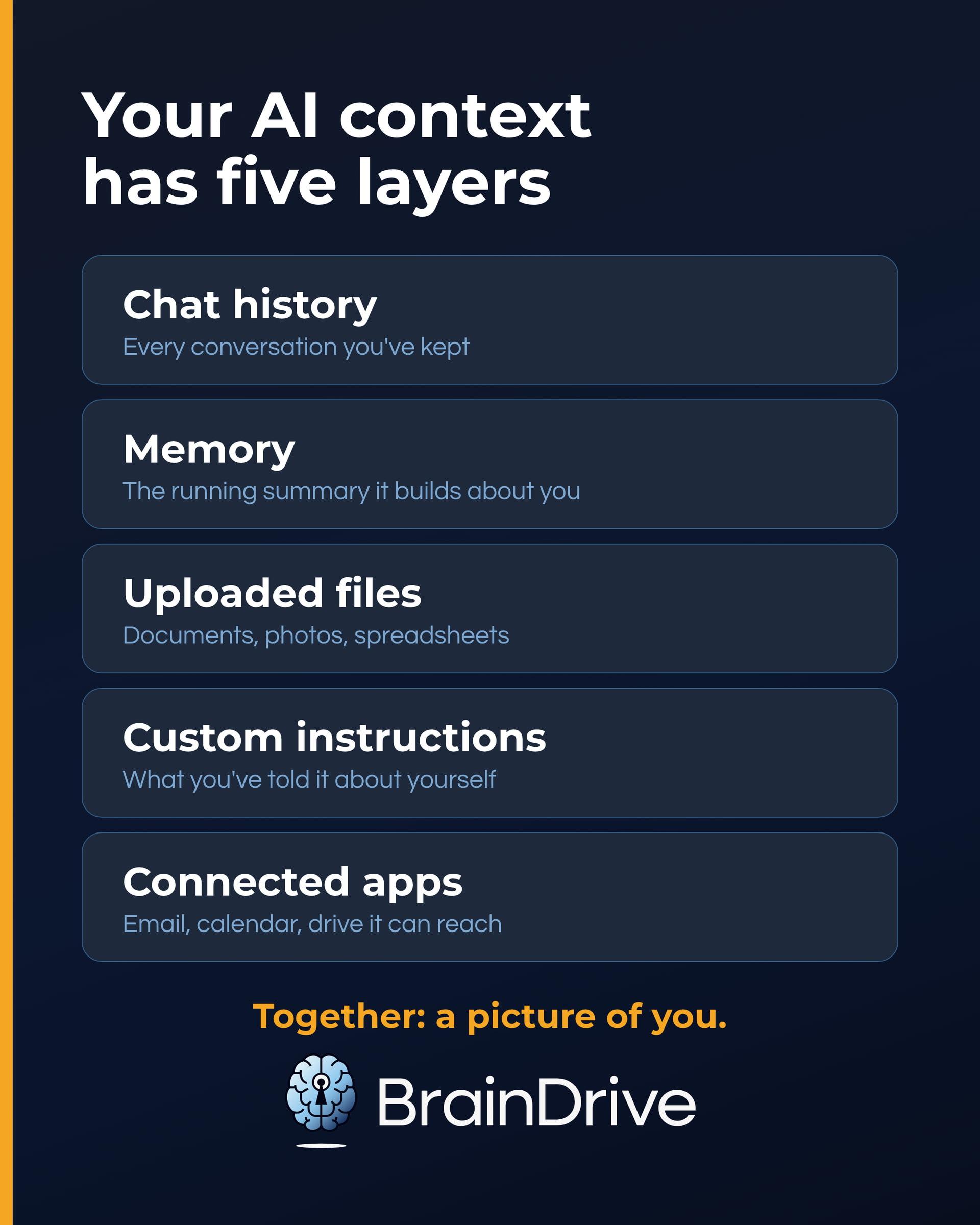
Memory is one layer of a larger accumulation. Add your chat history, your uploaded files, your custom instructions, and the apps you’ve connected, and you have what this guide calls your context: the full picture your AI holds of you. Someone reading one of your chats learns a little; someone reading all five layers knows your work, your health questions, your family, and your plans. The same is true on nearly every AI assistant, not just ChatGPT.
Who Can Reach Your Context
Four doors, in rough order of how often they matter:
- The provider, under its own policy. Retention windows, human review, and training defaults all apply to your accumulated context, not just single chats. (Our AI privacy guide covers the per-provider details.)
- A workspace admin, if you’re on a managed work account. As of August 2026, OpenAI states that administrators of managed accounts may be able to access, export, and delete conversations, and on Enterprise and Edu plans a compliance platform can export them in bulk. In plain terms: treat a work account as your employer’s workspace, not yours. The control here is separation. Keep anything personal on a personal account.
- Anyone with your unlocked device. This is the door people forget. Your entire context is one open laptop away from anyone in your household or office. A device passcode is an AI privacy control.
- Courts and legal holds. Deleted data has exceptions: a court can order a provider to keep chats it would otherwise erase. You can’t control a court, but you can control what exists to be preserved, which is one reason the far end of the dial below exists: setups where your context never leaves your machine.
Where Your Context Lives, Position by Position
Our AI privacy guide ranks AI setups on a six-position dial, from everything-lives-with-the-provider to everything-lives-with-you. Your context moves along the same dial:
| Position | Where the accumulation lives |
|---|---|
| 1–2. Consumer app | The provider’s servers, under its policy and your settings |
| 3. Business account or API | The raw model connection (the API) keeps no memory of you between calls; whatever app you type into becomes the keeper of your context |
| 4. Aggregator (OpenRouter) | The aggregator holds usage records; your prompts pass through unless you opt into storage |
| 5. Privacy-first services | Varies by design: Venice keeps history on your device; Lumo stores it encrypted so that even Proton can’t read it (zero-access encryption); the strongest modes keep no memory at all |
| 6. Fully local | Your machine. History, memory, and files are readable by no one you haven’t handed the computer to |
The pattern to notice: as you move right, your context stops living with the model provider and starts living with you. In the middle positions, the app you choose matters as much as the model behind it, because the app is what holds your history.
Frequently Asked Questions
(All answers as of August 2026.)
Does ChatGPT remember conversations?
Yes, in two ways: your chat history (until you delete it) and memory, a running synthesis of your chats that persists across conversations. The visible memory summary is not the whole of it, per OpenAI’s own docs. Both have controls, and they’re separate.
What does ChatGPT know about me?
Ask it directly: “What do you know about me? Be specific.” Then read the saved summary yourself at Settings → Personalization → Memory, and remember your chat history holds the raw material. Add whatever you’ve put in custom instructions and uploaded files. That combined picture is what this article calls your context.
How do I delete my ChatGPT data?
Three separate acts: delete memory (Settings → Personalization → Memory), delete chats (individually or all history), and if you want out of training, turn off “Improve the model for everyone” in Data Controls. (One exception to that toggle: rating an answer thumbs up or thumbs down can submit that conversation for training anyway.) Deleted chats are scheduled for permanent deletion within 30 days, with security or legal exceptions.
Can I turn off ChatGPT memory without losing my chat history?
Yes. Memory and history are separate things with separate controls: switching memory off (or wiping it) does not delete your conversations. The reverse is the part to watch. If you turn memory back on later, it can rebuild from chats still in your history.
Does deleting a chat delete the memories it created?
No, not automatically. What ChatGPT saved to memory from a conversation stays in memory after you delete the conversation. To remove it, delete the memory itself at Settings → Personalization → Memory.
Can I chat without ChatGPT remembering it?
Yes: Temporary Chat. A temporary chat stays out of your history and doesn’t create memories, though OpenAI keeps a copy for up to 30 days for safety. The full walkthrough, with its caveats, is in our ChatGPT privacy guide.
Can I export my ChatGPT history and move it to another AI?
Increasingly, yes. Gemini can import your full chat history from a ChatGPT or Claude export (not yet in the EU/EEA, UK, or Switzerland, and only on personal accounts), and Claude can import memory, the extracted facts and preferences, from other AI providers, though not full transcripts. ChatGPT offers no competitor import; the closest it has is uploading an exported conversations file into a chat on another ChatGPT account as reference, which OpenAI notes does not restore your chats, history, or memories. Independent interfaces like Open WebUI and LibreChat have accepted ChatGPT exports for longer.
The catch: each of these is a one-time copy on the vendor’s terms. The setups that make context genuinely portable are interfaces you own, where history lives in the app and the model behind it is swappable.
The Bottom Line
Your context is the most complete picture of you any AI system holds, and it is the part almost nobody manages. It is also the part that makes your AI yours: same model as everyone else, different results, because of what it knows about you. The chat you’re about to type is one decision. The accumulation is a standing one, for your privacy and for the value you’re building.
If you do one thing today, make it the look: open Settings → Personalization → Memory and read what’s there. Then choose where your context lives on purpose, the same way you choose for any single chat: by the dial, per task.
Every dated claim in this article was verified against the vendor’s official documentation in August 2026 (see the verification log). Policies change; this page follows the cluster’s quarterly re-verification commitment.
More Resources
- AI Privacy: The Ultimate Guide for 2026 & Beyond (the six-position dial this article extends)
- Is ChatGPT Private? What Really Happens to Your Chats (the click-by-click settings walkthrough)
- What Is the Most Private AI? Venice, Lumo, Duck.ai, Kagi, Local & More, Compared (the privacy-first providers, and how to keep your context while using them)
- Local AI for Non-Developers: The Complete 2026 Guide