Chat w/ Documents Plugin Development Updates

Hi @davewaring ,

Thanks for the note on the Docker issue. I’ll need to see the actual error logs from the document processing Docker container to help diagnose why it’s failing on your end (or on Mac).

On my side, I’m focusing on finishing the core integration of the BrainDrive LLM, chat history and document context this week into one plugin. Once I’ve finished that, we can schedule a call to go over the new chat with documents plugin, review the architecture, and troubleshoot the Docker issue together?

Hey everyone,

Wanted to share a progress update on the Chat with Documents plugin development:

What’s Working:

  • Successfully integrated the plugin with BrainDrive’s LLM model (it submits chat requests to BrainDrive LLM Model - whatever model(s) you are running locally with ollama)

Note: I’m merging the foundation of the BrainDriveChat plugin (which handles LLM and chat history access) with the collection and document management logic from the previous chat with documents plugin.

Currently In Progress:

  • Connecting the relevant context search pipeline (retrieval from vector embeddings)
  • Integrating BrainDrive’s chat history system
  • General code refactoring to keep things clean and maintainable

Coming Up Next:

  • Full end-to-end testing with document uploads, vector search, and LLM responses
  • Polishing the UI/UX for collection and document management

I plan to wrap up these core integrations this week. Thanks for following the progress!

2 Likes

sounds good thanks~!

Hey everyone.

Here’s a quick progress update on the BrainDrive Chat With Docs plugin:

What’s New

  • The plugin is now integrated with BrainDrive’s LLM - chats are processed through your locally running models (Ollama).
  • Chat history integration is complete, allowing conversations to be stored and accessed through BrainDrive (all data stored in one place).
  • The chats are grounded to the specific document(s) collection that you select, ensuring responses are relevant and contextual.

Test It

You can test the latest version of the plugin here:
:backhand_index_pointing_right: https://github.com/bekmuradov/BrainDrive-Chat-With-Docs-Plugin

Coming Up Next

  • UI/UX refinements for smoother collection and document selection
  • Further improvements to retrieval and contextual grounding
  • Refactoring (feature-driven architecture)

Thanks for following the progress!

Hi @DJJones ,

I’ve implemented a fix to make plugin re-installation idempotent by ensuring existing Docker containers are properly handled before startup.

PR Title: fix: handle existing Docker container conflicts during plugin installation

Please review and merge when you have a chance:

Thanks,
Beck

I apologize for the delay, was at a wedding over the weekend.

I merged the PR in so you and Dave should be all good for testing

1 Like

hey everyone,

quick update.

I have managed to remove the “waiting for services” loading state. However, the dynamic loading state still doesn’t work as expected. This flow doesn’t work as expected:

component mounted → wait for services initialization → if successful render content || if not render error

for some reason, it “frozes” on the initial state. But the good news, I was able to remove the “waiting for services”, and create collection form also works. Will continue tomorrow.

Thanks,
Beck

2 Likes

Hi @DJJones ,

I’ve pushed a fix to resolve an issue with loading plugin configurations in PluginRepository.get_settings_env_vars values.

This fix updates the PluginRepository.get_settings_env_vars to correctly decrypt and parse these env variables.

PR Title: fix(backend): PluginRepository.get_settings_env_vars decryption (Fixes #160)

Please review and merge when you have a chance:

Thanks,
Beck

Hi @davewaring ,

The BrainDrive Chat With Documents Plugin is fully functional and working now.

Here is the link to updated plugin:

Please follow same installation steps as before:

  1. Remove previous “BrainDrive-Chat-With-Docs-Plugin”
  2. Remove previous docker images
  3. Stop your braindrive server and re-start it without --reload flag
  4. Install plugin from interface

Let me know if you run into any issues during plugin installation.

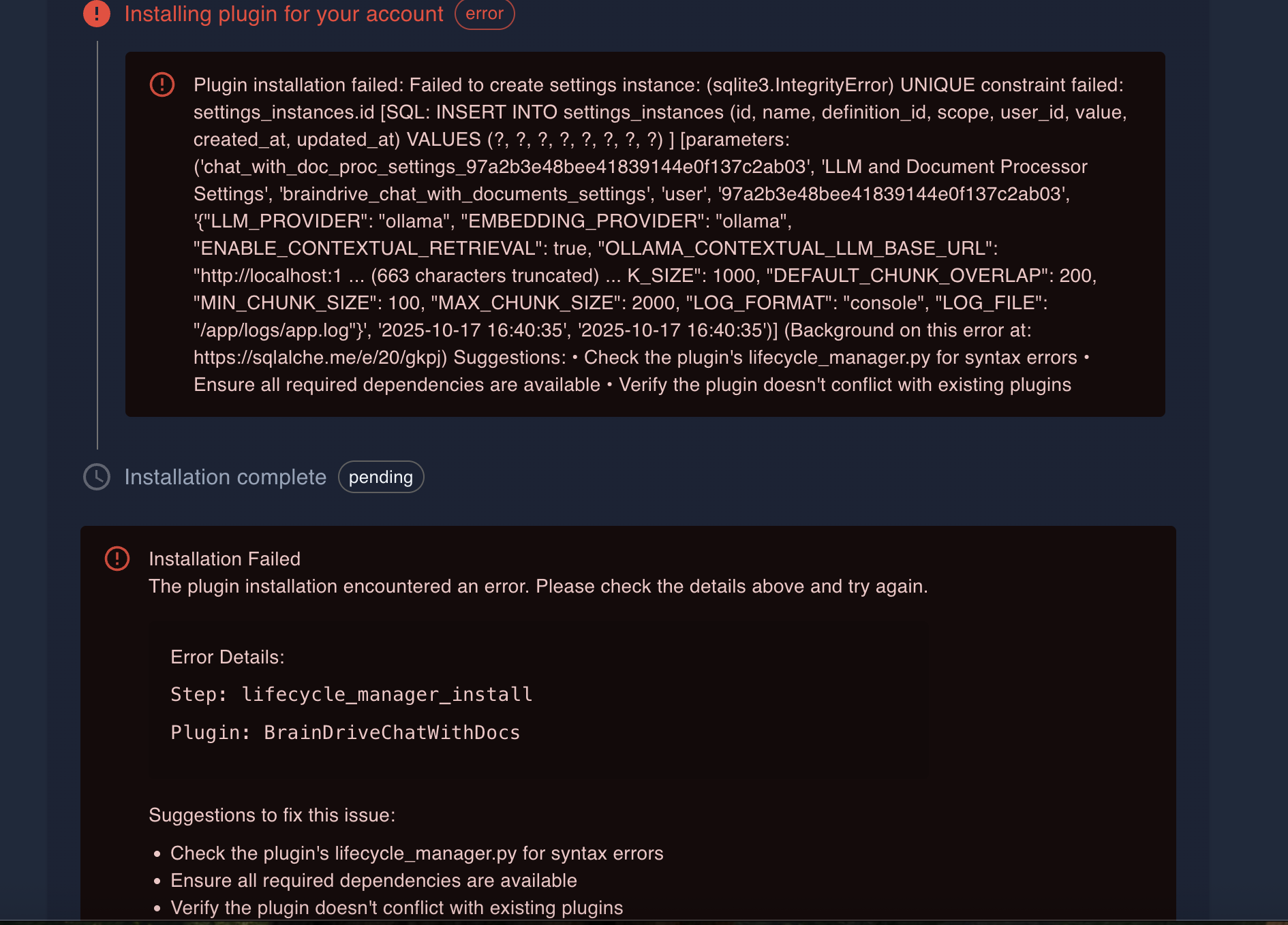
Thanks Beck. I am getting the following error when I install. I booked a call tuesday at 11 eastern to go over with you and see if we can get it working together. Thanks.

thank you for feedback @davewaring .

The issue comes because it conflicts with existing plugin in your database. I will update the plugin’s lifecycle manager, so it doesn’t conflict with existing plugin in db.

Hi @davewaring ,

I can’t reproduce same error from my side. Could you make sure to use this link:

Hi Beck,

Here is a screen recording. Let me know if I am doing something incorrectly.

Thanks
Dave W.

BrainDrive Chat With Documents Plugin Update

Hi everyone!
I’ve just pushed a new update to the chat with documents plugin:

  1. Switched engine - using docling for document processing (previously spacy-layout).

  2. Better Docker builds - optimized docker image size and build cache.

    • Initial build: 5-10 min
    • Subsequent builds: 10-30 sec
  3. New file types supported - .md, .html, and .pptx (presentations) are now accepted.

@davewaring

2 Likes

Hi All,

Here is the recording from my discussion with Dave J and Beck where we went through exactly how the new Chat w/ Docs local RAG system works.

Excited to get more people trying this out and letting us know what you think.

Questions, comments, ideas etc welcome as always. Just hit the reply button.

Thanks
Dave

Hi @beck Thanks for moving the plugin over to the BrainDriveAI github. I am adding issues there as I test the system so they are easy to track.

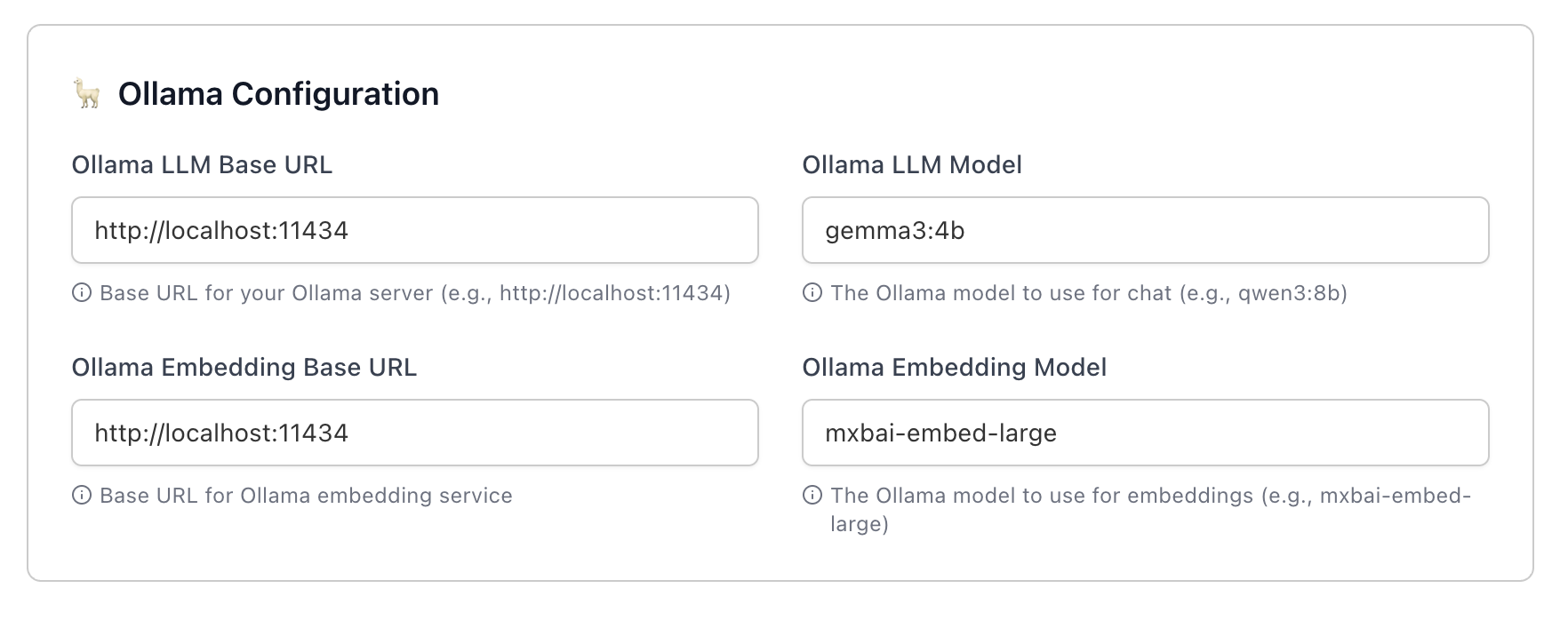
Also I want to move my embedding model to the local version. Does this look right to you as when I update it now the processing is failing.

Thanks
Dave

Also when I change the model on the dropdown do I have to change it in the settings too or does that update automatically?

Thanks
Dave W.

Hi @davewaring ,

Please make sure that you have mxbai-embed-large embedding model installed via ollama.

Regarding changing model:

  • changing model from dropdown applies to chat LLM model
  • changing model in the settings applies to chat with documents server processing (contextual retrieval, etc).

note: changing model from dropdown, doesn’t automatically apply it for chat with documents server.

Thanks Beck. I think I have it installed but I booked a call with you in the AM so we can go over it.

Thanks
Dave

Hi @davewaring ,

markdown file uploads should be working now. Please update the plugin (release version 1.2.1) and test again.