Chat w/ Documents Plugin Development Updates

@davewaring ,

I just tested same chat with docs setup with local mxbai-embed-large ollama model and it works.

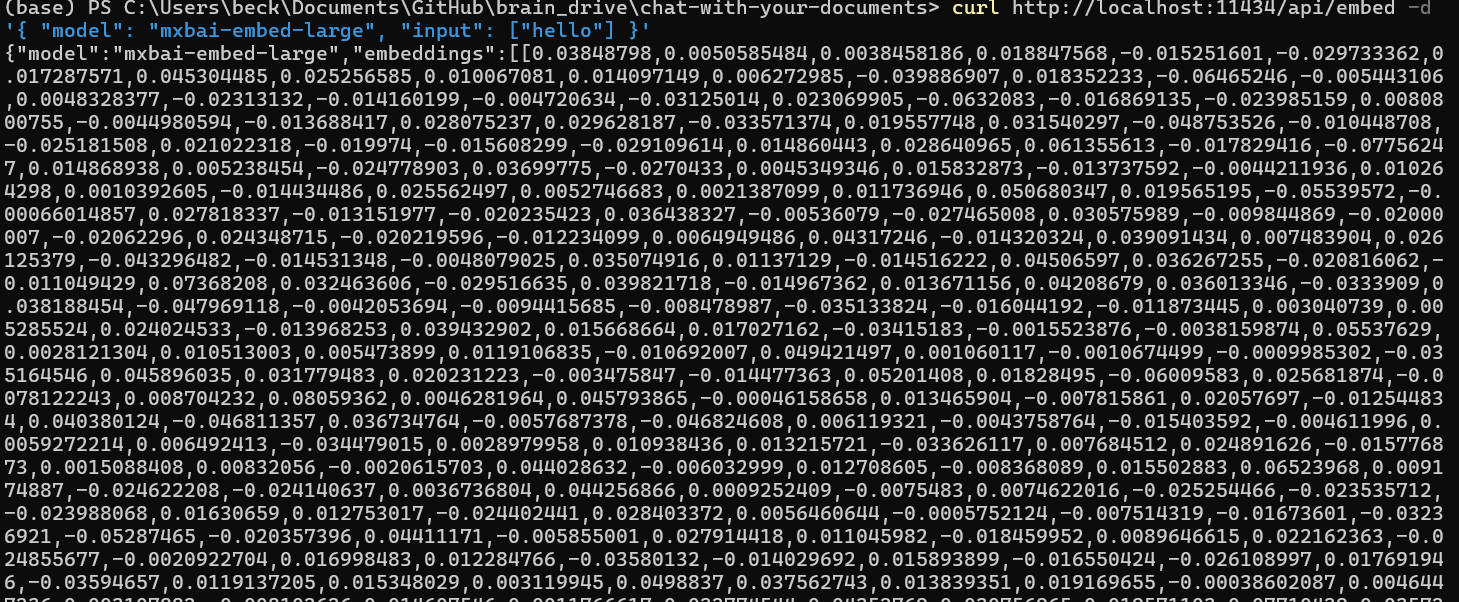
Try these commands in your terminal first:

curl http://localhost:11434/api/embed -d '{
  "model": "mxbai-embed-large",
  "input": "Llamas are members of the camelid family"
}'

and

curl http://localhost:11434/api/embed -d '{
  "model": "mxbai-embed-large",
  "input": ["Llamas are members of the camelid family"]
}'

you should see embeddings output in terminal

Thanks Beck will check it out and revert shortly.

Also here is the recording from my call with Beck and Dave today where we discussed all the things we can do to continue building the best local RAG system, including how the community can participate in different strategies for different markets etc.

I think this is a great opportunity for people to jump in and start optimizing the Chat W/ Docs system to work better with specific types of documents and use cases. Most of the stuff out there is one size fits all, and this is not a one size fits all situation.

Questions, comments, concerns, and ideas welcome as always. Just hit the reply button.

Thanks
Dave W.

Hi Beck,

I do see the embeddings output in the terminal. However still getting failure on upload.

Thanks
Dave

@davewaring ,

I updated chat with documents backend and added optimization configuration for embedding generation (batch size, concurrency limit).

Please re-install plugin, and try again.

Thanks,
Beck

Thanks @beck but still failing for me. I booked a call with you tomorrow morning so we can look at it together.

Thanks
Dave

Try testing from another browser tab or profile. I had a similar issue (I think it was cache-related), and a hard refresh didn’t help. I opened Braindrive in a different Chrome profile, and it worked there.

moved from chrome to safari same issue. May be something I am doing wrong on my end we can go through it tomorrow no worries.

Thanks
Dave

Hi All,

Had a good discussion with Beck today on creating an evaluation framework for the Chat w/ documents plugin. Here is the TLDR:

We are going to start with fact based Q an A around documents as our first use case to evaluate. Uploading reference material to your BrainDrive and asking questions about those documents and expecting a response grounded in those documents is a good first use case.

This is also a relatively easy use case to evaluate because the answer is either factually correct or not.

So this is how we are going to start evaluating the system, and Beck is starting work on building this evaluation system into the plugin itself and will have something to show us next week.

Here is the recording of the full conversation for anyone who is interested in digging deeper:

Questions, comments, ideas, and concerns welcome as always. Just hit the reply button.

Thanks
Dave W.

Hi @davewaring ,

Chat with docs plugin has been updated:

  • personas are working
  • shows retrieved chunks
  • uses optimized query transformation and intent classification
  • project files are moved below input box
  • dark and light theme switch also work

Version: 1.3.0

To test, delete plugin and service runtimes from BrainDrive and follow usual plugin installation.

1 Like

Hey @davewaring ,

Please test chat with documents plugin again, I have updated the package.

Before testing, make sure to remove installed services in service runtime and to remove plugin from plugins directory too.

Hi Beck,

Chat w/ Docs is working for me now in terms of retrieving context from the uploaded docs. I do not think the persona functionality is working however. Have a look at the below video and let me know what you think.

Thanks
Dave W.

Hi All,

Today Beck showed off the first draft of our new RAG evaluation functionality which he is now working to add to the chat w/ docs plugin.

This will allow BrainDrive Owners to easily evaluate the quality of the models and other settings that you choose for your Chat w/ Docs plugin.

If you check it out and have ideas on how we can improve it let us know. And stay tuned for more updates coming on this front in the near future.

Thanks,
Dave W.

Hi @davewaring ,

The evaluation system is now ready for testing! Here’s how to get started:

Setup:

  1. Re-install the plugin and delete the service_runtime folder
  2. Once plugin loads, go to Plugin Settings
  3. Add your OpenAI API Key and Judge LLM Model (e.g., gpt-5-mini)
  4. Click Save & Restart to restart backend services
  5. Click Service Status → Refresh to verify services are ready

Running Evaluations:

  1. Click the Evaluation button in the plugin header
  2. Click Run New Evaluation
  3. Select your collection and persona (persona selection is optional)
  4. Enter your questions (one per line, min 1, max 100)
  5. Click Submit and wait for processing
  6. View completed runs in the Evaluation Runs table

Thanks Beck!

FYI I updated the README for the project. Can you review and make sure it is accurate when you have a chance please? GitHub - BrainDriveAI/BrainDrive-Chat-With-Docs-Plugin

We’ll have to add a section on evals which I will work on as well.

Thanks
Dave

Hi @beck I took a crack at the Document-Chat-Service readme but it’s a bit beyond my AI powered skill level at this point. attached is a rough draft of the README.md and the in depth tech doc AI generated for me on it. Can you clean up the readme and post when you have a moment please? Thanks, Dave W.

README.md
In depth Overview.pdf

Hi @davewaring ,

The evaluation components have been updated and are ready to test!

Demo Video: https://drive.google.com/file/d/1V82Y4dlQau0H4IwyNicBGMqkirlQ5lme/view?usp=sharing

Setup Instructions:

  1. Update the Plugin
    - First, try updating from the BrainDrive UI
    - If that doesn’t work, follow the plugin re-install process
  2. Once plugin installed, configure settings
    - Go to Plugin Settings
    - Set your OpenAI API key and model
    - Configure other settings as needed

Testing the Evaluation Feature:

  • Submit your evaluation with custom questions
  • Note: Progress indicator is not yet implemented (coming next week)
  • Workaround: After submitting, wait on the screen for approximately 5 minutes (time varies based on number of questions)
  • Reload the page to see the results in the evaluation table
1 Like

Hi All,

Beck, Dave J. and I had a conversation today about how we are handling adding the AI model to the evaluation functionality Beck recently added to the chat w/ docs plugin.

Since the eval system is part of the Chat w/ Docs backend that Beck built for BrainDrive, there is no clean way currently to use the models installed on BrainDrive to run the evals.

We will work on building that out in the future but for now agreed to get it up and running by adding an OpenAI API key to run the evals.

This will get us up and running and the abilty to collect feedback so we can decide where to head next.

Recording of our conversation below. Any questions, ideas, or issues let us know.
Thanks
Dave W.

Hi everyone,

Here are the latest updates for Chat with Docs:

Evaluation Improvements:

  • Stage-based evaluation progress tracking with real-time feedback
  • Added 4-stage flow: Retrieving Context → Preparing Tests → Generating Answers → Judging → Completed
  • Real-time progress banner showing progress %, accuracy, time elapsed, and ETA
  • Fixed polling: stops on backend completion status, 10s intervals, 30s delay before judging
  • Conditional stats display: progress bars during early stages, metrics during judging
  • Banner auto-dismisses and clears localStorage on completion
  • Improved evaluation persistence state
  • Modular stage management for maintainability

Released in v1.6.0
Release v1.6.0 · BrainDriveAI/BrainDrive-Chat-With-Docs-Plugin · GitHub

1 Like