the above happens on main braindrive branch
I tried validating access token in https://www.jwt.io/
eyJhbGciOiJIUzI1NiIsInR5cCI6IkpXVCJ9.eyJzdWIiOiIyYThkYzc5M2FlNzQ0YzZiOGI0ZTdiMWJhNGUzZjFmZCIsImV4cCI6MTc1NjEzMDY4MS4zNzM1MSwiaWF0IjoxNzU2MTI5NzgxLjM3MzUxfQ.kNsl-aoOFiWGIFZyn6rxPU4Zmb2xs6xG3gAQEleaY2k
and got “Invalid Signature” error.
I guess it can be because server and my device in different timezones.
Have you made any changes to timezone in recent updates @DJJones ?
I did run into this issue before but it was not from CORS directly.. I had a bad process running in the backrgound and had to reboot the system.
I did clean up some CORS things last week and there is a PR regarding it, I think was last week or the week prior.
Just wanted to valid before I answered, Timezone doesn’t matter. Used UTC
Issue is resolved @davewaring ,@DJJones.
Root cause: The issue was caused by using the deprecated datetime.utcnow() method in the JWT token generation code.
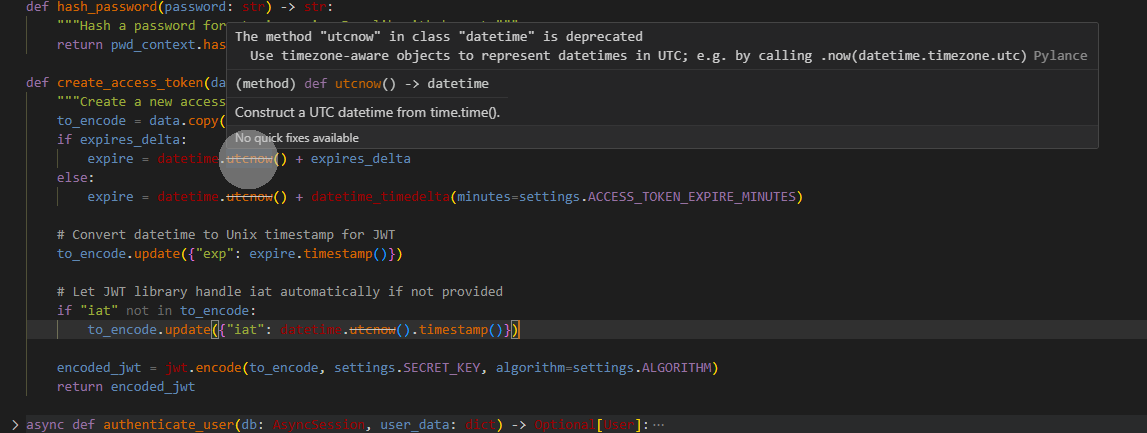
It’s deprecated as of Python 3.12 and the reason for deprecation is that it returns a “naive” datetime object, meaning it does not contain any timezone information. This was causing problems when performing calculations or comparisons with other datetime objects that do have timezone information, or when converting to timestamps.
Recommended replacement: datetime.now(UTC).
I replaced it in create_access_token in backend\app\core\security.py with datetime.now(UTC) and it works now.
Note: There are other methods in the codebase that need to be replaced as well since they also use datetime.utcnow().
1 Like
created new pull request @DJJones
PR #[45] includes a new migration (5d073fe444c9).
It adds the new plugin_service_runtime table and required_services_runtime field to the plugin table.
1 Like
Thank you
When I finish coding today I plan on doing another test run before merging. I did one this morning but I am not sure if it was with your finished code or still the WIP.
Just wanted to provide a heads up, this has been merged into the main. I installed just fine with it.
Awesome. So I should uninstall my BrainDrive, reinstall and then add the plugin and it should work now correct @beck ?
And right now the model is set and not changeable via the interface so the next step here is to get this working with all models installed a BrainDrive Owner has installed correct? @beck
Thanks,
Dave
Yeah, I would play it safe for the moment and just do a reinstall. That is what I have been doing as a process to just ensure I am testing it all and see what a new user would experience each time.
Right now if you wish to see chat with docs in action you would need to download his plugin from the repo ( I do not know the link off hand) and it should do all the work for you. Once we get that tested and mature it a little then we move to the next 2 steps
-
Create a Setting Plugin for all the available options to Chat with Document and at the same time Chat with Document would need to be tweaked to use setting info and not env info. This would also need a settings definition which allows for the structure and default data. This would install with the Chat with Document as well. (This is already coded to work like this so no extra work needed in the install process)
-
Once we get that working, we can look at adding it to be a Core Plugin to auto install during registration. This requires no heavy coding as this process uses the same system that the frontend uses to install.
1 Like
Hi All,
I had a good call with Beck yesterday on the Chat w/ Documents functionality. The good news is that I got it installed on my BrainDrive!
The bad news is I am having an issue with my page renderer unrelated to the Chat w/ documents functionality that’s preventing me from testing it. Dave J. is already on the issue and will have that worked out soon so we can give a full demo of the Chat/W documents functionality for everyone here.
As for next steps Beck is working on:
- Settings that allow BrainDrive Owners to change their .env settings without having to go to an IDE.
- Syncing up the plugin with the models that BrainDrive is already running instead of only the default model chosen in the plugin.
- Leveraging the existing chat history functionality of BrainDrive instead of duplicating.
- Creating the document service as a runtime dependency.
Questions, comments, concerns and ideas welcome as always. Just hit the reply button.
Thanks!
Dave W.
While I am resolving the rendering issue we can resolve this for you (and others) in a similar method that the AI Chat page is handled. The Page Initializer (backend/app/core/user_initializer/initializers/pages_initializer.py) provides a good example of how to build a page in the system through code. I haven’t did it myself but in theory take the example for a basic concept and simply add it into the installer for Chat with Documents after the plugin/modules are installed. When the user installs the plugin then they will also be provided with a functional page as well.
Thanks. I am fine waiting for the rending issue to be resolved and would prefer to put our time into that vs. a workaround unless you feel differently.
Thanks
Dave
To me this isn’t work around but rather proof of the concept, this is a perfect example of what builders and entrepreneurs would strive for. A user installs their plugin and the user can instantly start using it because the page auto builds for them based on the vision of the provider. They can of course change it or build their own page but this makes it easier for the non-techie to get installed and running the fastest.
This could be a great discussion for Monday as well.
ok that sounds great then will add to our monday agenda.
Thanks!
Dave W.
Hi All,
Please find the recording from today’s Chat w/ documents plugin update along with an AI powered summary of the discussion below.
We’re getting closer by the day.
Questions, comments, concerns, and ideas welcome as always.
Thanks,
Dave W.
Recording:

AI Powered Summary:
2. Beck’s Technical Update
-
Beck explains he looked into using the BrainDrive plugin settings component for managing plugin runtime environment variables.
-
He discovered it doesn’t work for his use case because it only supports plugin-level variables, not service runtime-level variables.
-
His proposal:
-
Instead of setting variables via plugin settings, prompt users via a pop-up during plugin installation.
-
Installation process:
- User inputs plugin GitHub link.
- System checks for required questions.
- User selects a build version.
- On clicking “Install Plugin”, the system checks if the plugin requires a service runtime.
-
3. Involving David for Clarification
- Bert brings David into the discussion because the question involves architecture decisions.
4. Conversation with David – Runtime Environment Variables
-
Beck reiterates that the plugin settings component doesn’t support the runtime service needs.
-
David explains:
-
The plugin settings API is designed for plugin data.
-
To support runtime environment configuration:
- Option 1: Stop using environment variables and directly fetch settings via API.
- Option 2: Keep current code and map settings data to environment variables.
-
Beck prefers Option 2 to avoid refactoring.
-
5. Handling Changes After Installation
-
David highlights:
-
If user changes plugin settings post-installation, service needs to be restarted.
-
A new backend endpoint is required to restart services on demand (currently, services only restart with BrainDrive).
-
During installation:
- Use default or placeholder values.
- Allow user to change them via the plugin UI later.
- UI should allow editing values and include a “Restart Service” button.
-
6. Data Storage and Encryption
-
Settings data is stored in the database, not browser storage.
- Default values are in
settings definition. - Instance-specific data is stored separately and is encrypted.
- Default values are in
-
API already exists for accessing these values.
7. David’s Example – OpenRouter Plugin
-
David points to the OpenRouter plugin as an example:
- In the
lifecycleManager, functioncreateSettingshandles settings definition. - Plugin has a component (
open router keys) for managing API keys. - This is a custom component, and there’s no strict schema enforced.
- In the
8. Developer Flexibility and Security
-
David emphasizes:
- Developers have freedom to design their settings.
- Only enforced rule: secure/encrypt sensitive data (like API keys).
- No imposed schema or constraints on backend expectations.
9. Wrap-Up
-
Beck recaps the plan:
- Use default values during install.
- Allow users to change settings via UI.
- Create a new endpoint to allow service restarts on settings change.
-
David confirms everything is on track and offers to help if needed.
-
Bert suggests scheduling a follow-up meeting.
-
They agree to meet at 10 a.m. the next day.
Hi @DJJones ,
I am having some issue with the plugin. The plugin works in “Studio” mode, but when I publish the page, it’s not accessible. It shows:
Module Load Error
Failed to load module: ChatWithYourDocuments:47244f8fe44d442ea942742c1a6c442d

Module 47244f8fe44d442ea942742c1a6c442d not found in plugin ChatWithYourDocuments
I have recorded a video of the issue: https://drive.google.com/file/d/1RCRW_uhqQCgYN6jZJ7o37Eul5UyQ8AXN/view?usp=sharing
Could you take a look when you have a chance?
Link to the plugin:
In the morning I will install this so I can actually lay eyes on it to see if I duplicate the issue, however 2 things I would try right off the bat.
-
Hard refresh of the page cache: I go into the dev tools on the network tab, disable cache and then reload the page from there.
-
Create a new page, add the module to it, publish it to see if the issue happens. This is just to make sure nothing strange is caught in the system.
This is a heads up
While I cannot get CYD to run, seems to time out starting docker and checking to see if healthy but that could be due to the fact I didn’t have docker installed when I first installed the plugin. (This may need a check)
However this didn’t stop me from trying to test out your issue, I just got it to duplicate it and can look into the issue. I did try the steps I suggested above and neither worked.