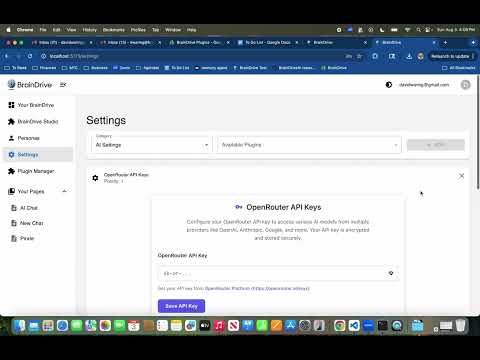
@kmalghani is building out an OpenRouter API plugin. If you’re not familiar with OpenRouter they are basically an AI Model API aggregator that allows you to access most of the popular AI models via one API. This saves you from having to hunt down and setup accounts and API’s with a bunch of different providers. Instead you just setup an account with OpenRouter and use their 1 API key to access all the models.
So they basically make it easy for us and charge a small markup on whatever the underlying API cost is.
Khurram will be posting updates here.
If you have questions, comments, concerns, or ideas just hit the reply button.
I am sharing a quick update on the OpenRouter API plugin.
I’ve recorded a short demo video to walk you through the current functionality, and I’m also attaching the plugin repository so you can install and try it out yourself:
Demo Video:
Plugin Repo:
Would love to hear your thoughts and feedback. Your input will be super helpful as we continue improving this.
Thanks Dave. @kmalghani Dave and I spoke this morning and he let me know that he has to do some work for the models to show on the backend so we should be good here for now.
Before continuing on to the next plugin can you give us some insight on how the development process differed for this plugin from the Open AI API plugin? I’m hoping to take these learnings and make sure that when we are developing similar plugins the development process moves faster and faster so any feedback you can provide on that front would be great.
Quick thoughts on the development process differences:
OpenAI Plugin: Built from scratch, lots of trial and error, took longer but got the job done.
OpenRouter Plugin: Used the template, had error handling built-in, much faster and more reliable.
Key Takeaway: The template approach is definitely the way to go. Future plugins should start with the OpenRouter template structure, it’ll save a ton of time and headaches.
The template handles all the boring lifecycle stuff so we can focus on the actual plugin functionality.
Plus, for OpenRouter to work properly, we had to add the OpenRouterProvider class to the backend’s AI providers system so it could actually connect to and use OpenRouter’s API.
Sorry for the delay, I was in the middle of messing with settings (for the unified renderer) as this was happening. I did merge the Open Router PR which looked like handled all of the OpenAI stuff as well.
More for me, I will need to do some extra testing to ensure when I roll in the unified we do not have issues.
Thanks Dave. I was able to get the plugin to install by downloading the zip file but the link was not working I think because a release needs to be created.
Also once I have the plugin installed and active where do I go to input the API key? I was looking under LLM servers in the settings but did not see it there.
I guess I didn’t create a release for it, odds are when I was testing to just did all local to prevent someone from grabbing something in development. I created a release for it, you should be able to just install as normal from the link and the panel will be in Settings → LLM Servers.
@DJJones following up on our convo about filtering models in Open Router from the Livestream today.
Looks like there is not a way to filter what models come through the API on their end, it would have to be done on our end. So not a show stopper for us, I’ll put adding a settings for this on the future roadmap for the plugin.
Design wise the only point I want to raise with putting it at the plugin level is in theory it would filter access to specific models in essence to all plugins what models can be selected. This is why in my mind so far is simply making sure all three of the selection dropdowns in the header will need to be searchable, if I type in GPT for models it will only display to me models with the name GPT no matter the provider.. this example could work with anything I type in the drop down.
Now if we were to take your idea and, change it a bit. There would be room for others to develop new plugins and in this case I see it working like this:
New Provider Plugin would allow you to create groups, then course plugins would need to be aware of how these groups are handled so it can leverage the exposed functionality. Just providing food for thought for future plugin developers.
Thanks @DJJones. I deleted the plugin and reinstalled from the repo link and having the same issue. Let me know if there is something else i need to do on my end. Thanks! Dave W.