BrainDriveAI Installer

Below is an overview of the BrainDrive Install System for Windows and Mac, followed by development discussions.
BrainDrive Installer Overview

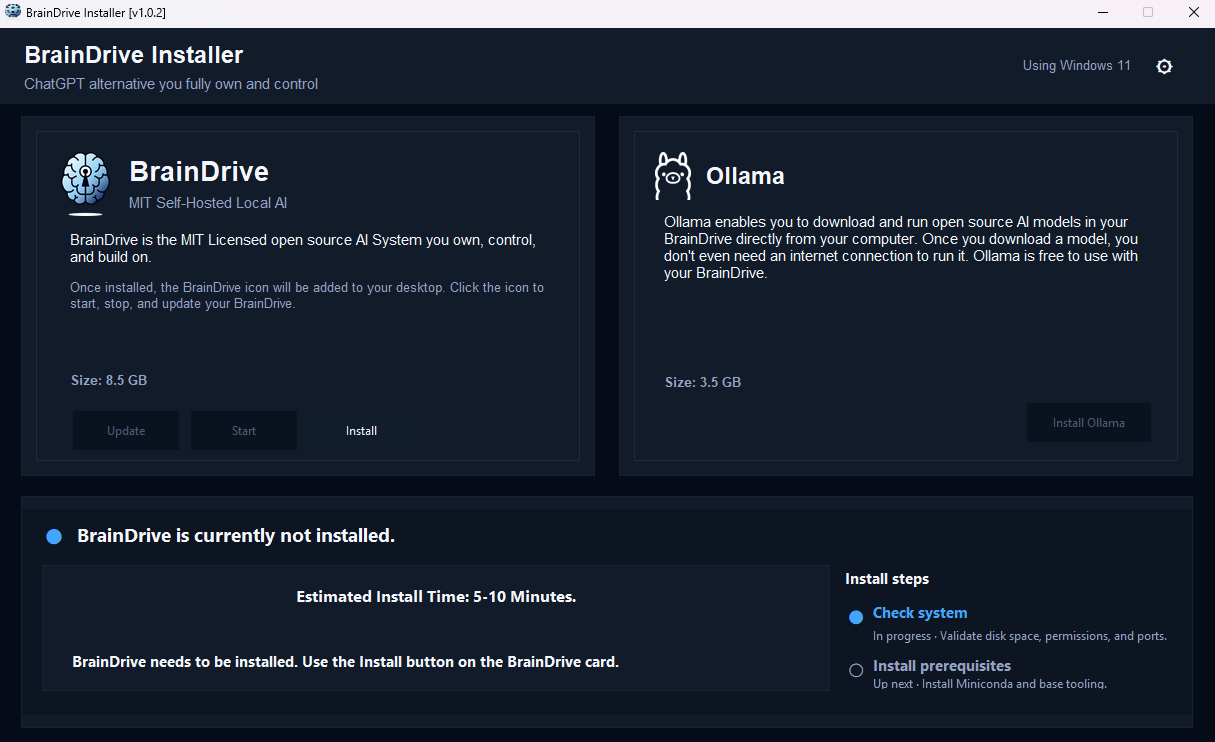
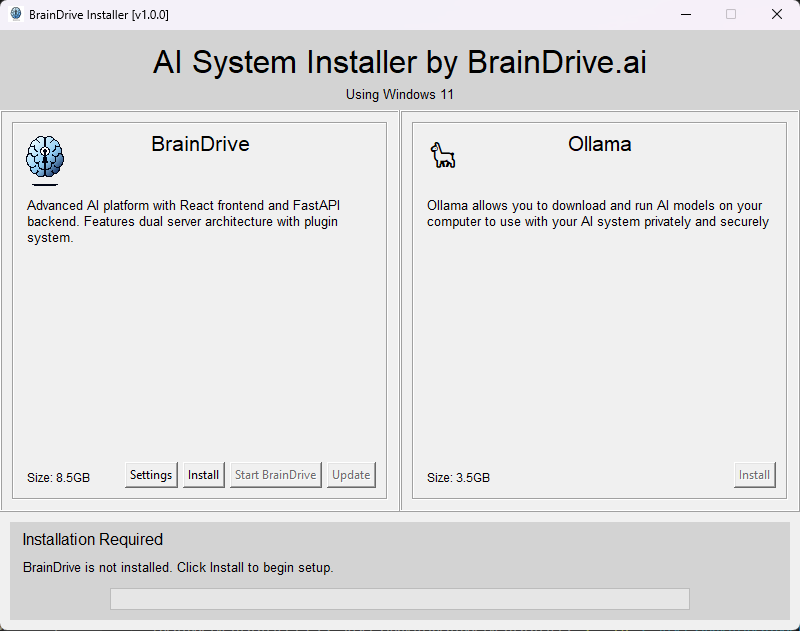
BrainDrive Installer is a desktop-oriented management utility that provisions and controls the BrainDrive AI platform on Windows. It orchestrates installation, configuration, updates, and lifecycle management for the BrainDrive repository, which delivers a FastAPI backend, a Vite/React frontend, and a plugin ecosystem tailored for AI-centric workflows.

The installer bundles quality-of-life improvements—port management, environment setup, secrets templating, background process supervision, and GUI feedback—to make running BrainDrive approachable for both new and experienced operators.


Key Capabilities

  • Guided Installation – Ensures Miniconda is available, clones the BrainDrive repository, prepares virtual environments, installs dependencies, and generates environment files tailored to the user’s configuration.
  • Service Control – Launches or stops the FastAPI backend (via Uvicorn) and the Vite development server for the frontend, tracking status through a shared process manager.
  • Configuration Management – Automates .env file generation and migration using the BrainDriveSettingsManager, preserving existing secrets when regenerating files.
  • Updates – Provides a one-click update button that safely disables while services run and executes git pull --rebase when the stack is idle to keep the local checkout current.
  • Logging & Diagnostics – Writes detailed logs under C:\Users\<user>\BrainDrive\T1\logs, surfacing backend readiness probes, button state transitions, and installer actions for troubleshooting.

Application Components

Graphical UI (Tkinter)

  • Presents “cards” for each managed product—card_braindrive.py contains the BrainDrive card.
  • Includes buttons for Install, Start/Stop, Update, and Settings, with dynamic enabled/disabled states.
  • Uses ButtonStateManager to ensure consistent control over interactive elements.

BrainDriveInstaller Core

  • Located in installer_braindrive.py, inherits from BaseInstaller.
  • Manages paths, repository details, conda environments, plugin builds, and service start/stop routines.
  • Coordinates with:
    • GitManager for cloning and updates.
    • ProcessManager for tracking backend/frontend processes.
    • NodeManager and PluginBuilder for frontend/plugin setup.

Settings Management

  • settings_manager.py reads/writes braindrive_settings.json, templates new .env files, and respects stored secrets like SECRET_KEY and ENCRYPTION_MASTER_KEY.
  • Dialog (settings_dialog.py) allows GUI editing of hostnames, ports, security flags, and performance parameters.

Logging Infrastructure

  • installer_logger configures file and console logging for each run.
  • System information, button state changes, cloning progress, backend health probes, and shutdown routines are all captured.
  • Logs are timestamped, making it easier to diagnose start-up issues (e.g., port conflicts, environment configuration errors).

Workflow Summary

  1. Launch Installer – Starts the Tkinter GUI and initializes the shared BrainDriveInstaller.
  2. Installation Phase
    • Confirms disk space.
    • Installs Miniconda if necessary.
    • Clones BrainDrive, sets up environments, builds frontend and plugins.
  3. Service Control
    • Start BrainDrive spawns backend (uvicorn main:app) and frontend (npm run dev) on configured hosts/ports.
    • Health probes ensure backend availability before the UI reports success.
    • Stop BrainDrive gracefully terminates processes and verifies ports are released.
  4. Configuration Updates
    • Settings dialog edits persist to JSON and optionally regenerate .env files.
    • Services must be restarted to apply runtime changes.
  5. Repository Updates
    • When services are idle, clicking Update triggers git pull --rebase inside the existing repository.
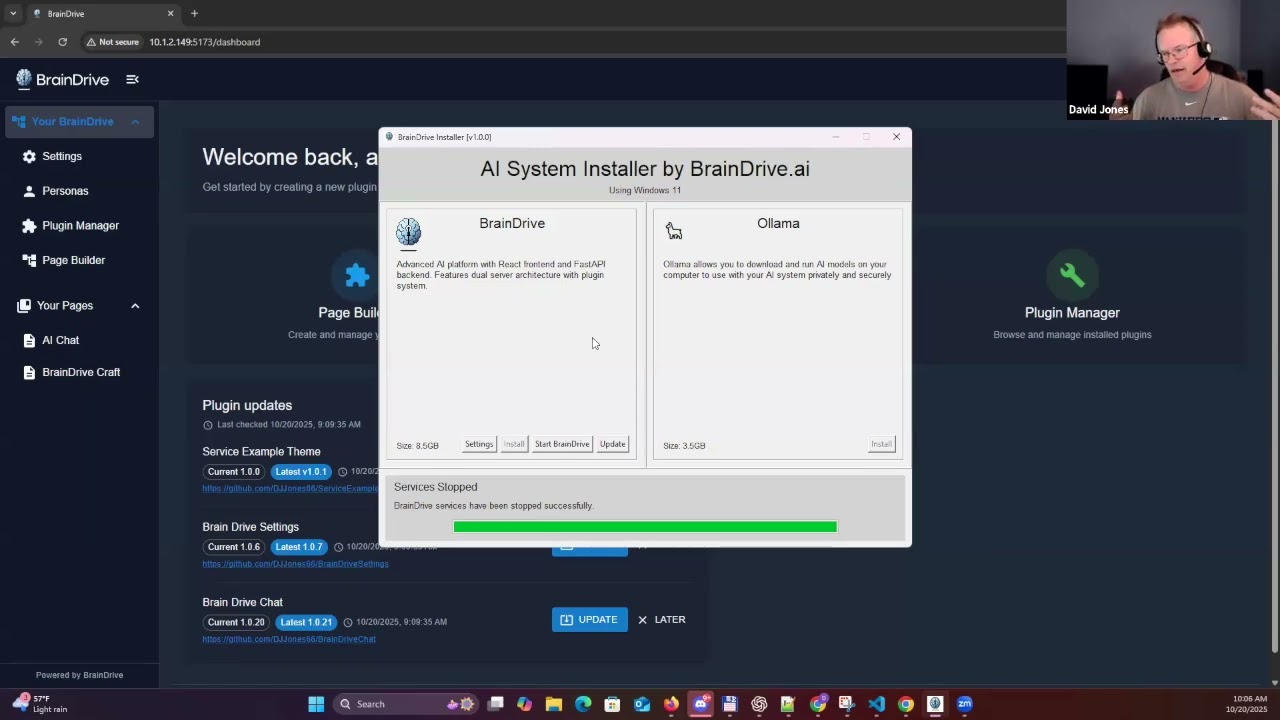
    • Button disables automatically if backend/frontend are active to prevent conflicts.
1 Like

Hi All,

Dave J demo’d his progress on the windows installer in today’s weekly dev call livestream.

He’s 99% of the way there on the Windows installer/updater and is expecting to have both Windows and Mac installers completed later this week!

Stay tuned to this thread where we’ll be posting as soon as they are availble for testing.

Thanks,
Dave W.

Hi All,

Here’s the latest update on the BrainDrive Installer project.

TLDR: Windows will go live this week, Mac we’re waiting on approval for developer program and will go live as soon as we are approved.

Questions, comments, concerns and ideas welcome as always. Just hit the reply button.

Thanks
Dave W.

@DJJones excited to have the BrainDrive Window’s installer live! I went back through the install portion of yesterday’s call and made notes on potential improvements for discussion. For now listing them as one to do in the projects list here. We can break any of the bigger ones out into separate tasks after we discuss.

Thanks
Dave W.

  • Having it install somewhere besides downloads by default.
  • Getting rid of what warning that’s required to start the installer.
  • Having it be the braindrive icon instead of a feather when it is installing
  • When I click the install button, the progress bar shoots to 50% right off the jump.
  • Sometimes it has a step listed above the progress bar and sometimes it does not.
  • Since this has to stay up the whole time I wonder if we should call it BrainDrive Runner or something like that?
  • Can we match the look and feel of this color wise to the dark mode of BrainDrive itself?
  • Need to use the latest logo icon which is in the BrainDrive-Core github repo for the installer and the icon on the desktop.
  • Desktop icon still says OpenWebUI, needs to be changed to BrainDrive
  • Text change for under the BrainDrive section: BrainDrive is the MIT Licensed open source AI System you own, control, and build on.

Once installed, a BrainDrive Icon will be added to your desktop. Click the icon to start, stop, and update your BrainDrive.

  • Text change for Ollama section: Ollama enables you to download and run open source AI models in your BrainDrive directly from your computer. Once you download a model, you don’t even need an internet connection to run it. Ollama free to use with your BrainDrive.
  • Making sure the GB numbers are correct.
  • Let’s discuss what is happening when you close down the runner and if we are going to keep it this way then having an hour glass or something so it doesn’t seem like it’s just frozen.

Windows latest release link:

https://github.com/BrainDriveAI/BrainDrive-Install-System/releases/latest/download/BrainDriveInstaller-win-x64.exe

1 Like

Just a small update, functionality so far everything is working and now just fine tuning the dynamic nature of elements on the screen so it can assist users through the process.

1 Like

The Mac installer is now available for testing, this is my weak point so all help would be cool

https://github.com/BrainDriveAI/BrainDrive-Install-System/releases/download/v1.0.3/BrainDriveInstaller.dmg

@navaneeth
This is my first pass at this, I am going look over it tomorrow but I wanted to make sure you have it to look at as soon as possible.

Any questions feel free to let me know.

Mac-update.md (8.4 KB)

1 Like

Yes, i tried installing the dmg file and it crashes . i will go throught the repo and md file later this day at my first chance .

I am assuming you used the downloaded dmg file that I created, which is the problem.

Did you attempt to build your own installer and run it?

I have been trying to clean up this repo so there may be an issue there, to me that is the first step because I can build the installer on a Mac, run it and install BrainDrive. However getting to run from a DMG is when the issues come into play.

I did not check the repo yet but implemented my own logic for mac installation (just executing commands one by one thats all). i faced lots of issues with minconda and dmg compiles , i guess that is what the main issue is in your repo but i was able to get it working

i am not able to attach any dmg files here so use this link to install @DJJones @davewaring : https://github.com/navaneethkrishnansuresh/BrainDrive-Core-2/blob/Nav-Phase-1.0-to-1.2/braindrive_navanneth.dmg

please check if its working on ur mac , its works well for me

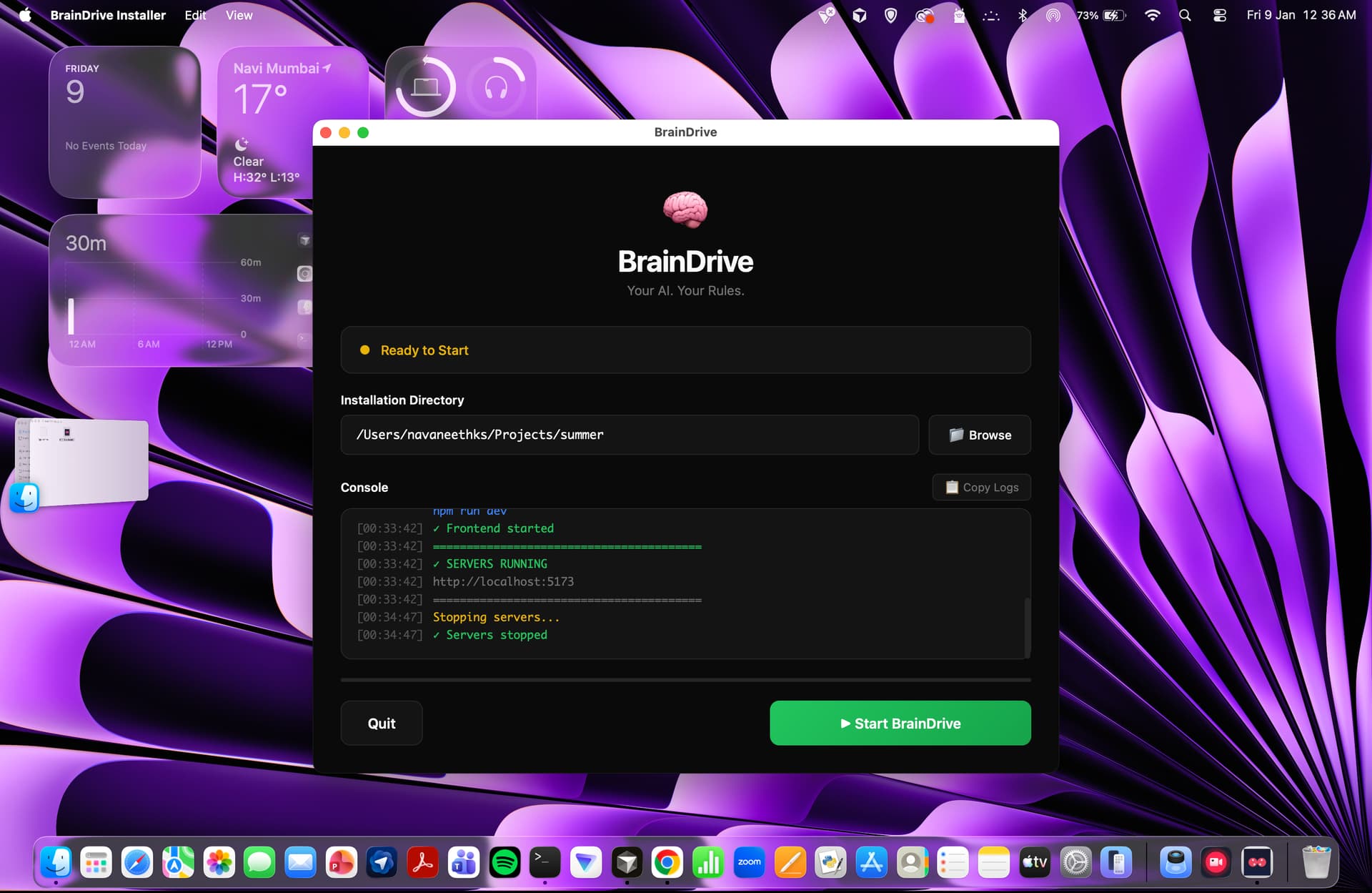
something like this should appear once installation is done.

when registering or logging in its getting a timeout or no response , so i guess a one or 2 commands given to backend was wrong but that can be solved easily since the main issue was starting braindrive via mac os installer

this version is not at all optimised , so u can consider it as a raw version . if this works i will share u my repo and we can reimplement that with the main @DJJones .

When I wrap up things I will give it a test… but

The goal here was not an installer but rather the same installer across the different operating systems. It works on Windows currently, so we were looking to make it function on the mac. The current status is the code/installer works but the issue comes up when bundled up as a dmg it behaved in unexpected ways and given my lack of Mac knowledge we were hoping you could bridge the gap there.

I will also wait for @davewaring to chime as well given this is a different direction then I had in mind.

sure , let me see , the current status of repo. tommorow we can discuss this on the meet

correct we are looking to get the same install system that @DJJones built for windows working on Mac. Dave has a start on it and we want you to take it across the finish line.

Look forward to discussing more tomorrow.

Thanks
Dave

1 Like

Hi @DJJones i did some debugging of the repo from my side and i found few problems and made some code changes. I hope this helps to cover some part of the scope:

Issue #1: App Crashes Immediately on Launch

:red_circle: The Problem

When users opened the DMG and ran BrainDriveInstaller.app, it crashed instantly with:

PermissionError: [Errno 1] Operation not permitted:

‘/Volumes/BrainDrive Installer/BrainDriveInstaller.app/Contents/MacOS/logs’

:magnifying_glass_tilted_right: Root Cause

The logging system in installer_logger.py tried to create a logs folder inside the DMG volume:

# OLD CODE (broken)

def _init_(self, log_dir=None):

*if* log_dir is None:

    base_dir = Path(PlatformUtils.get_executable_directory())

    log_dir = base_dir / "logs"   *# <- This becomes /Volumes/.../Contents/MacOS/logs*


self.log_dir = Path(log_dir)

self.log_dir.mkdir(*parents*=True, *exist_ok*=True)  *# <- FAILS! DMG is read-only*

Why it happens:

  • macOS DMG volumes are mounted as read-only by design

  • get_executable_directory() returns /Volumes/BrainDrive Installer/…/Contents/MacOS

  • The code tries to create logs/ there → Permission denied

:white_check_mark: The Fix

File: app-installer/common/src/braindrive_installer/core/installer_logger.py

Added a new static method _get_writable_log_dir() that detects read-only environments and uses appropriate fallbacks:

@staticmethod

def _get_writable_log_dir() → Path:

"""Find a writable directory for logs, with fallbacks for read-only locations."""


exe_dir = Path(PlatformUtils.get_executable_directory())


*# On macOS, check if running from DMG or app bundle*

*if* sys.platform == "darwin":

    exe_str = str(exe_dir)

    *if* "/Volumes/" in exe_str or "/Contents/MacOS" in exe_str:

        *# Use macOS standard logs directory*

        mac_log_dir = Path.home() / "Library" / "Logs" / "BrainDriveInstaller"

        *try*:

            mac_log_dir.mkdir(*parents*=True, *exist_ok*=True)

            *# Test if writable*

            test_file = mac_log_dir / ".write_test"

            test_file.write_text("test")

            test_file.unlink()

            *return* mac_log_dir

        *except* (PermissionError, OSError):

            *pass*


*# Fallback chain: installer data dir → executable dir → temp dir*

...

Fallback priority:

  1. ~/Library/Logs/BrainDriveInstaller/ (macOS standard for app logs)

  2. PlatformUtils.get_installer_data_dir()/logs/

  3. Executable directory (works when app is in /Applications)

  4. System temp directory (last resort)


Issue #2: tkinter Import Error

:red_circle: The Problem

After fixing Issue #1, the app crashed with:

ImportError: cannot import name ‘ttk’ from ‘tkinter’ (unknown location)

:magnifying_glass_tilted_right: Root Cause

The build script build-macos.sh created a Python virtual environment from pyenv Python, which on macOS doesn’t include tkinter by default:

# OLD BUILD SCRIPT (broken)

PYTHON_EXEC=“$(command -v python || true)” # ← Uses pyenv Python

“$PYTHON_EXEC” -m venv build_env # ← Creates venv without tkinter

Why pyenv Python lacks tkinter:

  • pyenv compiles Python from source

  • On macOS, tkinter requires tcl-tk to be installed first (via Homebrew)

  • Most pyenv installations skip this step

Build log showed the warning:

5099 WARNING: tkinter installation is broken. It will be excluded from the application

7375 ERROR: Hidden import ‘tkinter.ttk’ not found

:white_check_mark: The Fix

File: app-installer/macos/build-macos.sh

Rewrote the build script to use conda instead of venv, because conda includes a working tkinter:

# NEW BUILD SCRIPT (working)

# Check if conda is available

if ! command -v conda &> /dev/null; then

echo "❌ Error: conda is not installed"

exit 1

fi

# Create/update conda environment using environment.macos.yml

CONDA_ENV_NAME=“BrainDriveInstallerBuild”

if conda env list | grep -q "^${CONDA_ENV_NAME} "; then

conda env update -n "${CONDA_ENV_NAME}" -f "${ENV_FILE}" --prune

else

conda env create -n "${CONDA_ENV_NAME}" -f "${ENV_FILE}"

fi

# Activate and verify tkinter

eval “$(conda shell.bash hook)”

conda activate “${CONDA_ENV_NAME}”

# Verify tkinter works BEFORE building

python -c “import tkinter; print(‘tkinter OK’)”

if [ $? -ne 0 ]; then

echo "❌ Error: tkinter is not working"

exit 1

fi

The conda environment file (environment.macos.yml) already includes tk:

dependencies:

  • python=3.11

  • tk # ← tkinter support on macOS

  • nodejs=20.*

  • git


Issue #3: Bug in My First Fix (Unreachable Code)

:red_circle: The Problem

After deploying my initial logger fix, the app crashed with:

AttributeError: ‘InstallerLogger’ object has no attribute ‘logger’

:magnifying_glass_tilted_right: Root Cause

My edit accidentally made critical code unreachable:

# MY BROKEN FIX

@staticmethod

def _get_writable_log_dir() → Path:

...

*# Final fallback*

*return* temp_log_dir  *# <-- This RETURNS*


*# UNREACHABLE CODE BELOW!*

timestamp = datetime.now().strftime("%Y%m%d\_%H%M%S")

self.log_file = self.log_dir / f"..."

self.setup_logging()  *# <-- Never called! self.logger never set!*

:white_check_mark: The Fix

Moved the log file creation and setup_logging() call back into _init_ where they belong:

def _init_(self, log_dir=None):

*if* log_dir is None:

    log_dir = self.\_get_writable_log_dir()

self.log_dir = Path(log_dir)

self.log_dir.mkdir(*parents*=True, *exist_ok*=True)


*# These MUST be in \__init_\_, not in the static method!*

timestamp = datetime.now().strftime("%Y%m%d\_%H%M%S")

self.log_file = self.log_dir / f"braindrive_installer\_{timestamp}.log"


self.setup_logging()  *# <-- Now properly creates self.logger*

Issue #4: Build Script Function Order Bug

:red_circle: The Problem

The original build script called cleanup_and_exit before it was defined:

# Line 82-83 (CALLED)

if [ $? -ne 0 ]; then

cleanup_and_exit 1   *# <-- Function doesn't exist yet!*

fi

# Line 207 (DEFINED)

cleanup_and_exit() {

...

}

:white_check_mark: The Fix

Since we switched to conda (which persists environments), we no longer need cleanup. Changed to simple exit 1:

if [ ${BUILD_STATUS} -ne 0 ]; then

echo "❌ Error: PyInstaller build failed"

exit 1  *# <-- Simple exit, no cleanup needed*

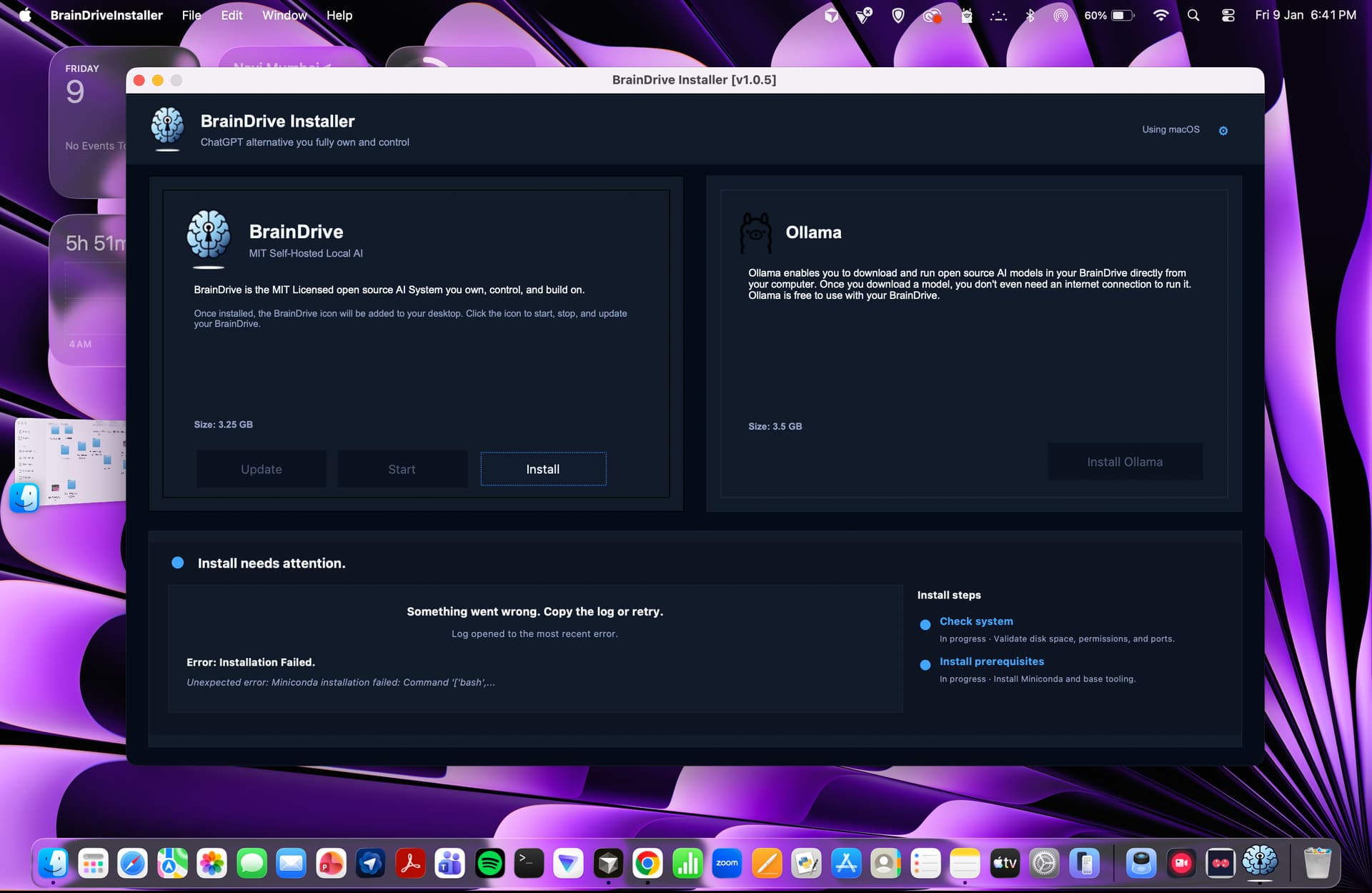
The DMG from repo crashed so my first step was to make the dmg runnable which i was able to by making the above changes but unfortunately the install process failed due to some bash based command conflicts . [Image attached below]

Hey @davewaring @DJJones

I found the issue for miniconda failed installation while running the app on mac os

it was trying to install miniconda for mac intel but mine is mac silicon which requires a different.sh file

so do you want me to keep a static setup (only allow a mac silicon installation since most of the users run on silicon chips) or a dynamic setup? ( auto detect if its mac or intel and based on that it selects the appropriate .sh file )

Let me know which one to proceed with.

Let’s get it working on Mac silocon first and then we can decide if we want to do the auto detect after that.

Also here are the notes from our call today where we discussed the mac installer for anyone else that is following the thread:

4) Mac DMG debugging progress (Nav’s updates)

  • Nav pulled the repo, modified things, and got the DMG to:
    • Open and show UI
    • But still fails on Install
  • Key issues identified:
    • Permissions issue creating a logs directory (DMG context differs from dev/build context).
    • Tkinter not recognized on Mac:
      • Nav added TCL/TK dependency so Tkinter installs properly.
    • Miniconda install fails:
      • Likely due to interactive EULA/terms acceptance during Miniconda install command.
      • Nav believes it’s a simple command change (e.g., silent/yes flags) to complete this part.

Navaneeth identified the issue (see above).

Thanks
Dave

Hey @DJJones @davewaring

The macOS installer now works and behaves as expected.

I’ve pushed the fixes to a new branch:

Since the repo handles both Windows and macOS, some shared code was modified. The changes should be backward compatible, but I wasn’t able to test the Windows build as I don’t have a Windows device.

Let me know if anything breaks — I’ll inspect and fix it.

Thanks!

2 Likes

Perfect, I will get on this before our meeting this morning and I can test if the changes flow to Windows.

Thank you