BrainDrive Update System

BrainDrive Updates — How We’re Designing the Update System

Today’s dev call (Dave W, Dave J, Nav) included a deep design conversation about how BrainDrive will handle updates for users. This is one of those features where the AI-first architecture makes a huge difference compared to traditional software — so we wanted to share the thinking.

Watch the Discussion

The Problem

BrainDrive is iterating fast. Users install via Docker and have no way to know a new version exists. Worse, many of our new features ship as file updates (to-do lists, digest, new AGENT.md templates) — not just code. Without a migration system, existing users miss new features entirely.

The Core Insight: Two Types of Updates

We landed on separating updates into two categories:

  1. Code updates (Docker image, backend, frontend) — these just push through. No user customization to conflict with.
  2. File/onboarding updates (library files, instructions, starter pack content) — these go through an AI-mediated review. The AI compares what you have now vs. what’s new, identifies conflicts with your customizations, and walks you through the options.

This matters because BrainDrive’s files are self-evolving — the AI and the owner both modify them over time. Blindly overwriting would destroy customizations people have made.

How It Works

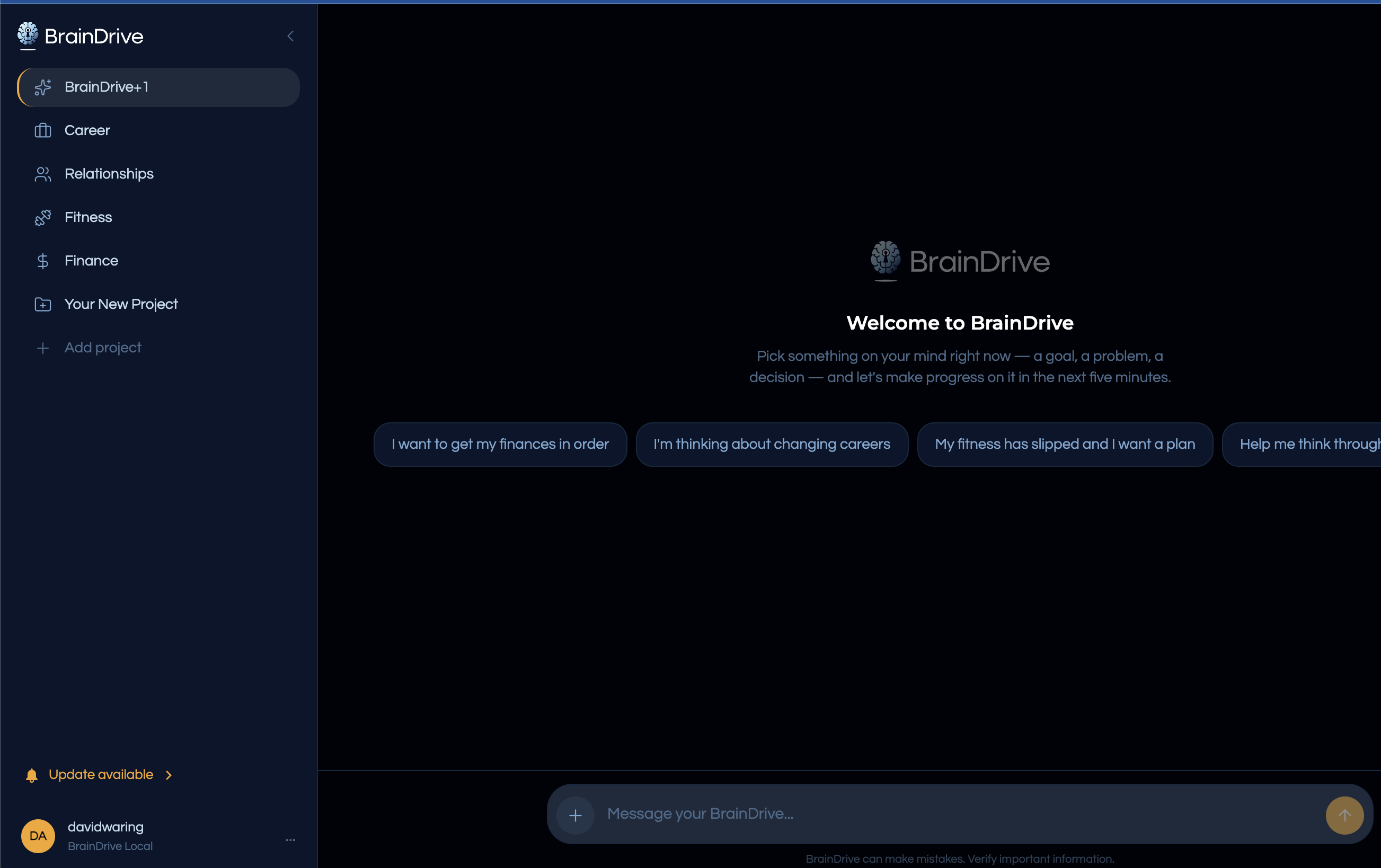
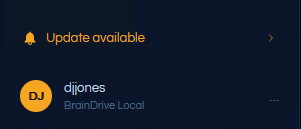
When there’s an update, a small indicator appears in the sidebar. Click it, and you’re talking to BrainDrive Plus One (your AI) about the update. The AI reads a migration manifest that ships with each new version and does an impact analysis against your current setup:

  • “The to-do update is clean — no conflicts.”
  • “The AGENT.md change adds one line. Your other customizations are unaffected.”
  • “The interview prompt has been rewritten, but you’ve modified yours — here’s what’s different.”

You can accept all (most people will do this), go piece by piece, or skip everything. Declined updates are remembered — you won’t be nagged.

The Design Principle That Simplifies Everything

The key insight from the call: the AI only needs current state vs. new state. No change history. No tracking 80 intermediate diffs. Just: what exists in your BrainDrive now, and what’s the update bringing? The AI does a fresh comparison every time.

Dave W put it simply: “If I told you to update my BrainDrive, you wouldn’t go look through 80 changes. You’d look at what I have now, look at what’s new, and make the update.”

This is what makes the system tractable. We’re not building a version control system — we’re leveraging the AI’s ability to understand context and resolve conflicts intelligently.

Smart Re-surfacing

One nuance: if you decline the to-do feature today, and six months later you’re trying to use something that depends on it, the AI should say: “I know you passed on to-dos, but the calendar feature you’re interested in builds on it. Want to revisit?” Not nagging — context-aware guidance.

What’s Next

Dave W is finalizing the spec and UX design. Dave J implements. The update system is launch priority #2 (after BrainDrive Models), but since texting is nearly done, Dave J will finish that first.


This is part of our building-in-public series. We review every dev call transcript against our specs to catch gaps and keep docs in sync — this session found 5 improvements to apply.
@DJJones Update System spec below which includes the things we discussed in the convo above:
update-notification-spec.md (23.4 KB)

I’m starting work on the UX piece now and will let you know when the branch is up.

Thanks
Dave W.

@DJJones notification ux added. Also added a section in the spec for expected action here which is this triggers the convo with BrainDrive +1. Check the library for the latest spec, it’s in the braindrive-repo folder under production projects.

Opened a draft PR with this change.

Any questions or issues let me know.

Thakns
Dave w.

@DJJones — the update system spec and UX design are ready for you.

Branch: update-system on BrainDriveAI/BrainDrive (branched from latest main). Draft PR will be created once you push your first commit.

Spec: update-notification-spec.md

What’s in the spec:

  • Version check against GitHub Releases API (stable Monday releases only — dev builds use the pre-release flag)
  • Sidebar indicator: amber bell + “Update available” + chevron, lower-left above user name
  • Click navigates to BD+1 which auto-starts the update conversation (zero typing from the owner)
  • AI-mediated file migration using a cumulative manifest (system/updates/manifest.md)
  • Accept all / cherry-pick / skip — the conversation is the dismiss mechanism (no X button)
  • system/version.json needs a channel field (stable or dev)

Open questions for you (in the spec as OQ-1 through OQ-4):

  1. Can the backend execute host-level Docker commands from inside the container?
  2. What’s the exact update script command?
  3. Version format — need the build pipeline to tag Friday builds as GitHub pre-releases, Monday builds as full releases
  4. Script restart reliability — does the container come back cleanly after pulling a new image?

Let me know if anything in the spec is unclear or if you want to walk through it on the call Friday.

1 Like

Found a few issues in the plan and wanted your plan to be updated:
Issues:
Findings (highest risk first)

  1. High: The restart handoff is underspecified: the plan says the AI will “pick up with migration” after containers restart, but there’s no durable orchestration state to resume safely after process death (plan.md, plan.md). This can strand users mid-update or cause duplicate runs.
  2. High: No failure/transaction model is defined for partial apply (e.g., “accept all,” item 2 fails, item 3 succeeds). applied.json semantics are not precise enough yet to prevent inconsistent state and repeated prompts (plan.md, plan.md).
  3. Medium: There’s a policy conflict between “merge/preserve user customizations” and “apply overwrites if confirmed.” That’s okay as a product choice, but acceptance criteria currently read as if merges are always preserved (plan.md, plan.md).
  4. Medium: Version comparison is underspecified (tag_name vs local version); you need canonical normalization/comparison rules (v28.4.16 vs 28.4.16, date-style ordering edge cases) to avoid false positives/negatives (plan.md).
  5. Medium: The doc references the wrong open question: “Requires… see OQ-4” should likely point to host-level Docker execution (OQ-1), not restart reliability (OQ-4) (plan.md, plan.md).
  6. Medium: Security section does not address prompt-injection risk from user-edited files feeding the migration conversation, or the blast radius of Docker socket access if you choose that path (plan.md, plan.md).

Overall, this is a strong spec: clear UX intent, good scope boundaries, and a practical split between code updates and AI-mediated file migrations. The biggest gap is operational safety (resume/rollback/partial failure rules). If you tighten that state machine, this is very implementation-ready.

Solutions:
Updated the plan directly in plan.md, and resolved all six review issues while keeping architecture alignment with your PAA-MVP-Test/blueprints and .../docs references.

What was fixed:

  • Restart/resume gap: added durable update session orchestration (system/updates/session.json) with explicit phases, single active session, and restart-safe idempotent resume.
  • Partial-failure ambiguity: defined atomic per-item migration transactions, write-ahead status, fail-fast behavior for “Accept all,” and precise last_applied advancement rules.
  • Merge vs overwrite conflict: clarified policy to merge-by-default, with explicit overwrite only after preview + owner confirmation.
  • Version comparison ambiguity: added canonical normalization and numeric tuple comparison rules, plus safe fallback behavior when parsing fails.
  • Wrong open-question link: corrected dependency reference from OQ-4 to OQ-1.
  • Security gaps: added prompt-injection hardening for owner-edited files, bounded metadata/no hidden config channels, and least-privilege guidance for host Docker execution.

I also aligned wording with deployment/security drift guards (data preservation, rollback/reversion path, fail-fast readiness, bounded contract inputs) without changing the intended architecture or product flow.
Full spec is below
update-notification-spec.md (32.7 KB)

This is the branch for the feature: feature/braindrive-update-notification-library-migration

I have merged in all of the most recent changes so it is complete caught up as of this morning. I have not played much with it as far as testing other than code, I can say from a UX aspect that since I didn’t update my local yet it is displaying an Update is present. That seems to be working.

@DJJones — update from today’s test pass against feature/braindrive-update-notification-library-migration.

What’s working: The sidebar indicator lights up correctly on a fresh-owner install (26.4.13 → 26.4.20).

Two findings led to spec updates:

1. Auth bug in update-adapter.ts (fix staged locally). Clicking “Update available” was 401’ing on POST /api/updates/conversation/start. The adapter uses plain fetch without the Bearer token, while other client routes go through authenticatedFetch which handles auth correctly. Fix is a one-import swap plus two function call changes — Dave W has it staged locally. Let him know if you want it pushed to your branch or if you’d rather do the fix yourself.

2. BD+1 rejected the update context as “not my domain.” Once auth was fixed, the update conversation actually started — but BD+1 pushed back on the bootstrap JSON because the base AGENT.md has no concept of update conversations as part of the advisor role. Design decisions for how to fix are captured as D18–D26 in the spec.

Review drafts (in Library — not pushed to your branch, so you can review before deciding how to land):

Two new open questions for you:

  • OQ-5 — bootstrap context needs current_content + proposed_content per migration item so BD+1 can reason about the actual diff per owner (decided in D22/D23)
  • OQ-6 — skill attachment wiring: seed update-handler into the starter pack + register it on the BD+1 project’s skill list

Let us know what you think — happy to walk through it on the Friday call if easier.

@DJJones it looks like the draft PR with the UX changes I screenshotted earlier in this post did not get submitted. What you have in your branch currently is close enough so I would say just keep going and I can come back around and polish the UX once we get the flow working.

Any questions or issues let me know.

Thanks
Dave

Fair enough, and since this is a UI issue you will be free to come in during testing to make changes how you please.

1 Like

Thanks. A few things landed since post #7 that are worth flagging:

Auth fix PR: fix(client): use authenticatedFetch in update-adapter by davewaring · Pull Request #91 · BrainDriveAI/BrainDrive · GitHub — targets the feature branch (not main), swaps fetch for authenticatedFetch in update-adapter.ts. 3-line diff. Verified on the fresh-owner path. Merge on your timing.

Branch cleanup: origin/update-system has been deleted. It only had one orphan commit (a ROADMAP Phase 2 reorg from 2026-04-20) which was already on main via PR #87 — nothing of value was lost. All update-system work lives on feature/braindrive-update-notification-library-migration as you had it.

Original UI mockup recovered: Tracked down what Dave W meant about the “UX changes I screenshotted earlier” — the 2026-04-16 sidebar indicator was built as live Chrome DevTools injections against the running app, never written to a file. The final refined script + design-intent notes are now preserved in the Library so it’s not lost for Dave W’s polish pass during testing:

https://github.com/BrainDriveAI/BrainDrive-Library/blob/main/projects/production/braindrive-repo/update-notification-sidebar-mockup.md

Your current implementation (TASK-005, commit da43336) matches the mockup closely — the two visual deltas are (1) lucide-react CircleAlert vs. the custom bell SVG in the mockup, and (2) a thin amber border around the pill that the mockup didn’t have. Both are cosmetic and fine under your “UI changes later during testing” framing.

Nothing needed on your end right now beyond the PR review. Next milestones are still OQ-5 (bootstrap context enrichment) and OQ-6 (skill attachment wiring) before the end-to-end flow is exercisable.

@davewaring
Is this it?

yes that’s it and i have to keep writing so the forum will let me post thanks