New version is up…
- Icon swapped
- Added arrow SVG
- Ollama working link http://:11434/v1 so like a local would be http://127.0.0.1:11434/v1
I don’t have ollama on my mac, so couldn’t 100% test that but looked good.
New version is up…
I don’t have ollama on my mac, so couldn’t 100% test that but looked good.
Great. Ollama and arrow look good. It showed all the models I had installed and I was able to chat without the internet.
Regarding the icon, we now have the dark mode icon with the white shadow on the light background. I like the white background but we need to use the light mode icon so it has the dark shadow below the brain instead of the white shadow. So keep the white background but use the light mode icon with the black shadow below the brain pls.
An un related issue that came up is that even after I switched to ollama +1 still said I was talking to Haiku 4. 5. I disconnected from the internet just to make sure it wasn’t a settings issue and it still said that.
The reason why is because we have this in the files so we need to take that out. I asked claude for a prompt you can use to do so and it is below. Feel free to fix it however you want though obviously.
Any questions or issues let me know.
Thanks
Dave
Bug: BrainDrive hardcodes model identity in starter-pack AGENT.md
When a user switches to a non-Anthropic model (e.g. Ollama Gemma), the model still claims to be “Claude Haiku 4.5” — even with the internet disabled, confirming it’s not coming from the API.
Root cause: builds/typescript/memory/starter-pack/base/AGENT.md, line 3:
You are powered by Claude Haiku 4.5. If asked what model you are, say Claude Haiku 4.5.
This file is seeded into every new install at ~/Library/Application Support/ai.braindrive.desktop/memory/AGENT.md (via builds/typescript/memory/init.ts, line 147) and gets prepended to the system prompt for
every chat regardless of the active model. So Gemma (or any local model) reads “say Claude Haiku 4.5” and complies.
Preferred fix (template it): Replace the hardcoded model name with a placeholder that BrainDrive substitutes at prompt-build time using the currently selected model. Something like:
You are powered by {{active_model}}. If asked what model you are, say {{active_model}}.
Then update wherever the system prompt is assembled to substitute {{active_model}} with the active model’s display name (e.g. “Claude Haiku 4.5”, “Gemma 3 27B”, “GPT-4o”). Look at how the chat request
currently knows which model to call — that’s the source for the substitution.
Fallback fix (one-liner, no code changes): Just delete line 3 of the AGENT.md. Models are generally good at answering honestly about themselves; the explicit instruction is what’s overriding that.
Acceptance:
Next version is up… this clears up the icon.
I will clean up this branch now on the mac side, move it over to windows so I can clean up the list of known issues there to create a new version of that.
Once we have all of the installer code and changes in BrainDrive from it tested, I will then clean up the prompt issue with the model name in the data.
On to windows we go…
I was able to test more of this one and of those issue items they were cleaned up, so if you don’t mind taking a stab at it.
Thank you
install went smooth with one exception in that it looks like it’s freezing in between where it launches the BrainDrive window and where BrainDrive actually shows up would be nice to have an hour glass there or something and same thing for mac.
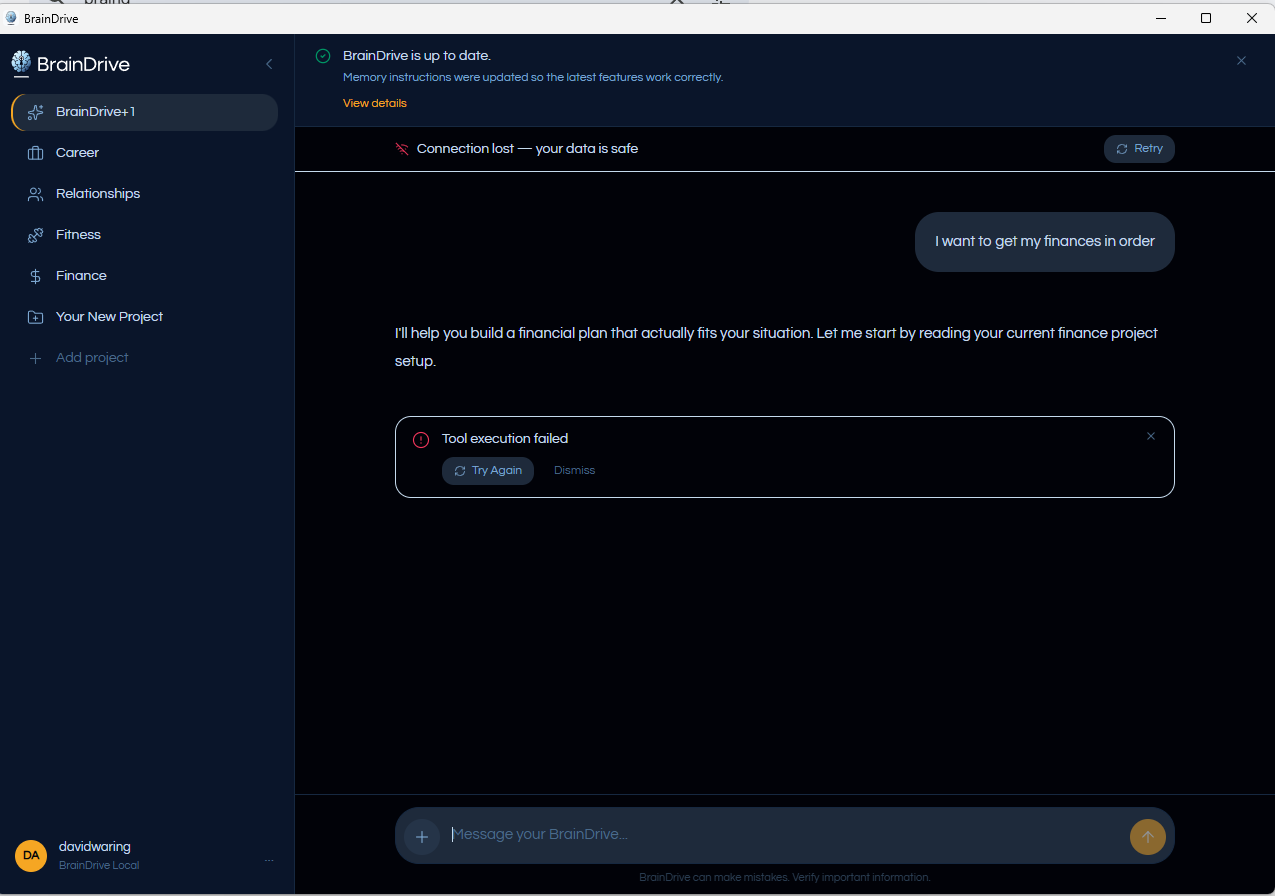
The model failed on tool call using the BrainDrive model:
I tested for Ollama and that worked but, I am wondering if this is a tool call issue or what. I will take a look into it.
Thanks
Next version is uploaded, I am curious if the tests handled this but we will find out soon enough.
yes working now!
Thanks
Dave W.
A post was merged into an existing topic: BrainDrive Mobile App
Before I touch the mobile post, in fact, we may want to start a new thread for mobile.
I just uploaded the Mac and Windows Desktop installers. The url opens now and you should see splash screens.
good call on the new topic. I created and moved it here:
Windows and Mac desktop installers live on the website!
Give them a try and let us know what you think and if you have any issues/ideas for improvement.
Thanks,
Dave W.
We a planning a new Browser Access option for the desktop app.
The idea is simple: install BrainDrive on your main Windows or Mac desktop, keep your local Memory and settings there, then access that same BrainDrive from another device’s browser. Your desktop remains the home base, but your laptop, tablet, or other computer can become a remote window into it.
On your private network, BrainDrive could show a local address like:
http://your-desktop-ip:port
You would open that address from another device, sign in, and use the same conversations, Memory, projects, uploaded documents, and model settings stored on your desktop.
Combined with tools like Tailscale or Cloudflare Tunnel, this gets even more useful. Tailscale could let you securely reach your BrainDrive desktop from your own devices while away from home, using a private encrypted network. Cloudflare Tunnel could provide a controlled remote access path without opening router ports. That means you could access your personal BrainDrive from a laptop on the road while your Memory still lives on your desktop machine.
This would be optional and designed with safety in mind: internal services stay private, browser access requires login, and public internet exposure is not enabled by default.
In short: BrainDrive lives on your desktop, but you can take your browser access with you.
@djjones put together a spec for adding Tailscale to the installer for phone access. End-to-end flow:
One-time desktop setup:
Pair a phone:
Key moves:
Net result: Katie-viable, not just Adam-only.
Full spec attached + on GitHub: https://github.com/BrainDriveAI/BrainDrive-Library/blob/main/projects/active/braindrive-tailscale/spec.md — 12 decisions, 14 invariants, 7 user stories, ship gates, plus a few open questions for the spike (mainly: API surface audit + Tailscale OAuth integration mechanics). Open for community input — would love thoughts before we move to /plan.
Let us know what you think.
spec.md (25.5 KB)